 30-day money back guarantee
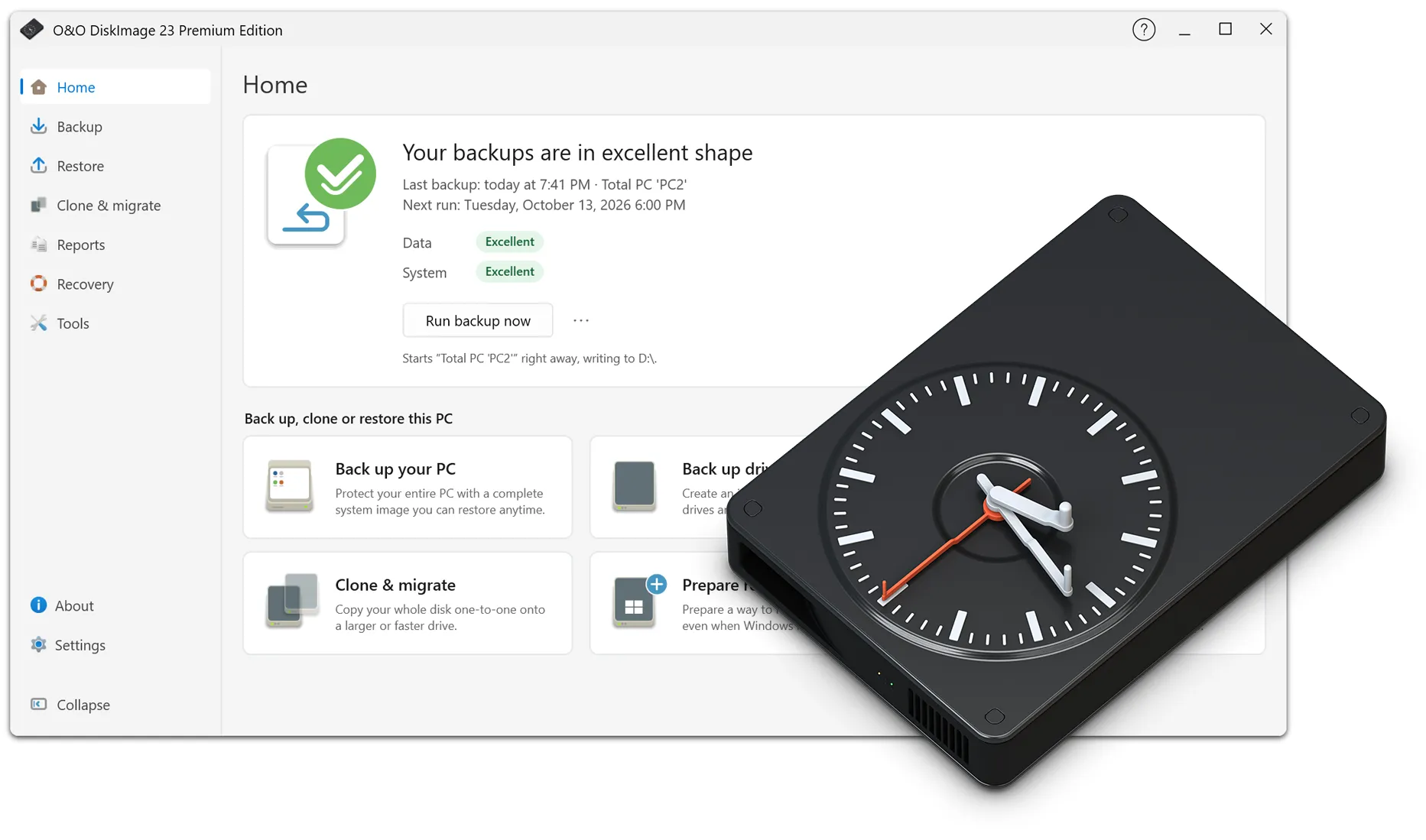


Back up, restore, protect – with O&O DiskImage 23 Premium Edition
O&O DiskImage 23 Premium Edition offers a comprehensive range of features for professional data backup, recovery, and system protection. It enables both complete system images and flexible file-based backups, while providing powerful tools for virtualization, hardware migration, forensic backups, and automated backup strategies. The new guided user interface provides a clear overview of the current protection status, backup history, and important recommendations.
Also new in version 23 are automatic backup chains, making it easier to set up and manage long-term backup routines. In addition, local backups can be automatically transferred to a second storage location in the cloud, such as S3-compatible storage. Combined with the exclusive Fortress Mode, which enables particularly secure backups in an isolated Windows environment, O&O DiskImage 23 Premium Edition provides comprehensive options for reliably protecting your data.
Another advantage: O&O DiskImage 23 Premium Edition is also an integral part of the O&O ToolBox, the complete O&O software suite featuring 15 powerful Windows tools for maintenance, performance, security, and data management. This gives you not only first-class backup and imaging technology but also a comprehensive all-in-one solution for system maintenance – efficient, convenient, and future-proof.
Backup and Imaging Features
- Complete system images (bit-by-bit images of all drives)
- Incremental and differential backups
- File-based backup of individual files and folders
- Forensic 1:1 backups including empty sectors
- Sector-based backups with intelligent filtering (used sectors only)
- Hot imaging while Windows is running
- Automatic inclusion of new drives in backup plans
- Backup of encrypted drives (BitLocker, TrueCrypt-compatible)
- Hybrid backups (files and images)
- VHD/VHDX support
Recovery and Restore Features
- Complete system recovery on identical hardware
- Machine Independent Restoration (recovery to different hardware)
- Selective restore of individual files and folders from images
- Bootable recovery environments (bare-metal recovery)
- Recovery of individual partitions or entire drives
- Automatic drive detection during recovery
- Repair of damaged boot configurations
- Windows PE-based recovery environment
Backup Scheduling and Automation
- New: Automatic backup chains for long-term backup routines
- New: Individually configurable backup intervals and automatic continuation
- Scheduled backups with flexible intervals
- Automatic retries in case of errors
- One-click backup for complete backups
- Wizards for recurring backup jobs
- Backup profiles for different strategies
- Automatic deletion of outdated backups
Storage and Compression Technologies
- Multi-level compression for an optimal balance of size and speed
- Adaptive compression depending on content and file type
- Support for very large drives (> 16 TB)
- Deduplication of redundant data blocks
Encryption and Security
- AES 128/256-bit encryption
- Password-protected backup images
- Checksums and signatures for data integrity
- Integrity verification before recovery
- Optional encryption of individual partitions
- Protection of critical system areas such as MBR and partition tables
Backup Destinations and Storage Locations
- New: Additional cloud backup as a second backup destination
- New: Automatic transfer of local backups to the cloud
- New: Support for your own cloud storage, including S3-compatible storage
- New: Background cloud uploads without interrupting normal work
- Backup to internal and external drives (HDD, SSD, NVMe)
- Backup to USB, eSATA and Thunderbolt devices
- Storage on NAS and network drives (SMB/CIFS)
- Backup to cloud storage via mounted network drives
- Direct backup to DVD/Blu-ray
- Support for removable drives, UEFI and large NVMe drives
User Interface and Ease of Use
- New: Completely redesigned, guided user interface
- New: Central overview of backup history and current protection status
- New: Intelligent recommendations when action is required
- New: Clear presentation of important backup information
- Context-sensitive quick actions
- Graphical representation of storage structures
- Central management of all backup types
- Wizard mode for beginners and expert mode for professionals
- Notification and logging system
- Automatic error detection with clear guidance
Virtualization and Conversion
- Conversion of images to VHD/VHDX
- Physical-to-virtual migration (P2V)
- Booting system images as virtual machines
- Conversion between different image formats
Special Features of the Premium Edition
- Exclusive Fortress Mode for backups in an isolated Windows environment
- Integration of Fortress Mode into the Windows Recovery Environment
- Creation of external boot media for independent backup and recovery
- Advanced driver integration for recovery operations
- Automation features for IT environments
- Forensic 1:1 copies for analysis and data recovery
Windows Tools and Recovery System
- Windows PE-based boot environment
- Driver integration for the recovery system
- Disk checking and repair tools
- Network access in the recovery environment
- Backup and recovery without a working Windows installation
- Data recovery and diagnostics
- Access to damaged or deleted partitions
- Analysis of damaged images
- Logging of backup operations and error events
- SmartMonitoring for backup storage devices
Performance and Scalability
- Multithreading support
- Optimized for modern multi-core processors
- High performance with large amounts of data
- Maximum stability for long-running backups