
• Backup & transferir datos
      • O&O DiskImage Copia de seguridad de datos profesional para sus PC
      • Datos y sistemas de rescate
      • O&O DiskRecovery Recuperación de datos profesional simplificada
      • O&O BlueCon Recuperación ante desastres cuando una PC o un servidor ya no se inicia
      • Cambiar a Windows 11
      • Migration Kit for Windows 11 La facilidad de movimiento del PC
      • Optimizar sistemas
      • O&O Defrag Acelera tu PC con Windows
      • O&O DiskCommander Pruebas de escaneo y copia de seguridad de disco
      • Cloud soluciones
      • O&O Syspectr Solución gratuita de gestión de TI desde la cloud
      • O&O FileDirect Transferencia de archivos. Fácil. Segura.
      • Proteger datos y sistemas
      • O&O SafeErase Detenga el robo de identidad con la eliminación segura de datos
      • Programas gratuitos
      • O&O ShutUp10++ Herramienta antiespía para Windows
      • O&O RegEditor Edición del registro de Windows
      • O&O AppBuster Desactiva las aplicaciones que no deseas
      • O&O Lanytix Análisis de red rápido y sencillo en la LAN
      • O&O DeskInfo Toda la información importante del sistema directamente en el escritorio
      • O&O ToolBox ¡Nuestros productos top
        en un pack a un precio especial!
      • Ver todos los productos Descubre todas nuestras herramientas para Windows
      • Descargas Obtenga aplicaciones de instalación y portátiles
      • O&O Blog Mantente al día con nuestro blog
      • Soluciones corporativas Beneficios para tu empresa
      • Proteja los datos de su empresa
      • O&O DiskImage Solución de backup para su empresa
      • O&O DiskImage Enterprise Copia de seguridad de datos y recuperación del sistema a niveles industriales
      • Mejora la productividad
      • O&O Defrag Máximo rendimiento para tus servidores y PC Windows
      • Recuperación de datos en toda la empresa
      • O&O DiskRecovery Recuperación de datos profesional con solo pulsar un botón
      • O&O BlueCon El sistema de recuperación cuando un equipo o servidor ya no arranca
      • Proteja los datos de su empresa
      • O&O SafeErase Eliminación segura de datos empresariales críticos
      • Freeware
      • O&O ShutUp10++ Cumplimiento del uso de Windows en la empresa
      • Tu Gestión TI en la Nube
      • O&O Syspectr Supervisión y gestión remota para Windows
      • O&O Blog Manténgase actualizado con nuestro blog
      • O&O PowerPack Enterprise ¡La solución completa para sus servidores y PC a un precio económico!
    • Ver todos los productos >>>
      • Recursos
      • Documentación Documentos relacionados con los productos
      • Guías de usuario en línea Leer manuales en línea
      • Descargas Descargar archivo
      • Whitepapers Estudios y libros blancos
      • FAQ Preguntas frecuentes
      • First aid Primeros auxilios en caso de pérdida de datos
      • Obtenga ayuda
      • Descripción general Nuestras ofertas de servicios
      • Registro Registre su producto O&O
      • Trial users Soporte para usuarios de prueba
      • Registered customers Clientes registrados
      • Recuperación de licencia Reenvíe su licencia O&O
      • Partner
      • O&O Partner Program Sus ventajas como socio de O&O
      • O&O Partners Socios autorizados de O&O en su región
      • Compañía
      • Acerca de nuestra empresa Fabricante líder de herramientas de sistema
      • Lanzamientos de productos Lista de fechas de lanzamiento y versiones
      • The O&O Group Made in Berlin. Made in Germany.
      • Equipo Nuestro equipo directivo
      • Contacto Cómo contactar con O&O
    • Contacto
    • Boletín

Empresas Privado Socios

O&O DiskCommander 5

Pruebas de escaneo y copia de seguridad de disco

desde 29,90 €

Comprar ahora
Prueba ahora
Garantía de devolución del dinero de 30 días Incluido en la O&O ToolBox – 59,90 € al año
O&O DiskCommander 5 - Pruebas de escaneo y copia de seguridad de disco
Windows 10 Windows 11
¿Buscas un respaldo fácil? Para saber más, haz clic aquí.
  • Resumen
  • Funciones
  • Capturas de pantalla
  • Apoyo
  • Qué hay de nuevo
  • Actualizar
  • Comprar ahora

Changes in the respective versions of O&O DiskCommander (changelog)

Version 5.1

5.1.1020 – released on 02/03/2026

Added:

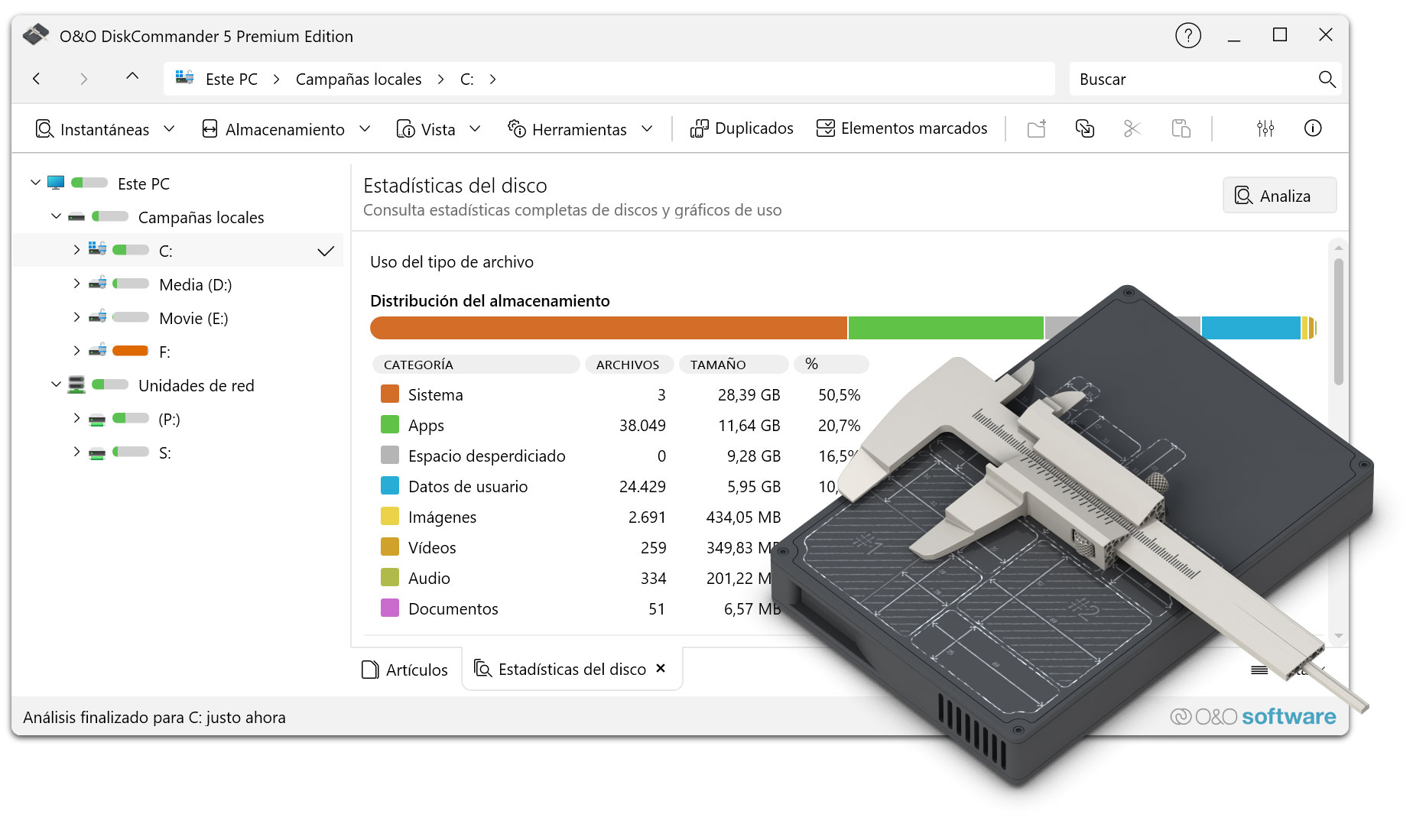
  • File Type Usage Tab
    • New main navigation tab displaying grouped statistics and analysis on disk usage by file type categories (Images, Videos, Audio, Documents, Apps, System, User Data)
    • Live updates during analysis
    • Full localization support
  • Context-Sensitive Online Help
    • Access via F1 key or help button
    • Displays documentation relevant to the current view or active tab
  • Paste Security for Read-Only Volumes
    • Prevents pasting files into read-only volumes such as mounted disk images, backup volumes, or analysis snapshots
  • Password-Protected Disk Image Support
    • Added password dialog for password-protected disk images
  • Tree Map Double-Click Navigation
    • Double-click folders in the Tree Map to navigate into them
    • Double-click files to open them
    • Intuitive navigation similar to File Explorer

Changed:

  • Tree Map Accessibility Improvements
    • Improved color palette with higher contrast per level
    • Dark mode adaptation
    • WCAG-compliant text contrast
  • UI Terminology Updates
    • “Statistics” replaces “Storage”
    • “Overview” replaces “Disk statistics” across the UI and localizations
  • Scan Controls and Status Display
    • Updated scan controls and header buttons
    • Improved reflection of current state and background activity
  • Memory Management
    • Optimized internal memory management

Fixed:

  • Fixed Open Files enumeration where file handles were skipped
  • Fixed memory leak in display logic
  • Paste, move, and delete operations now properly check deletable/moveable status of marked items
  • Warning is shown if only a subset of selected items can be processed
  • Status bar and file lists now correctly update after background actions and navigation
  • Various UI glitches fixed in Tree Map, File Type Usage, and other views

Info:

  • Compatible with Windows 10 and Windows 11; x86, x64, and ARM architectures
  • Available in German, English, French, Italian, Spanish, Russian, Japanese, and Simplified Chinese

Version 5.0

5.0.1018 – released on 01/21/2026

Added:

  • Virtual disk support
    • Analysis of VHD/VHDX disk images and O&O DiskImage files without mounting
    • Copy/paste to extract files from backups
  • Open Files
    • Display of all currently opened/locked files incl. Process Information
    • Filtering by Drive/Folder
    • Context menu actions for file management
  • Analysis comparison
    • Comparison of two disk analyses side by side
    • Visual change indicators: added, deleted, changed, unchanged
  • File management
    • Rename files and folders directly in List View (F2 or long click)
    • Display of SHA1 and SHA256 hash values for integrity check and duplicate detection
  • Views & Visualization
    • Custom View Modes: Details, Small/Medium/Large Tiles, Icons
    • Thumbnail previews for image files (48×48 to 256×256) in tile and icon views
    • File type usage display with breakdown (images, videos, audio, documents, apps, system, user data)
  • Analysis & Operation
    • Analysis queue management for multiple analyses incl. intelligent demolition dialog
    • Automatic analysis start when switching to statistics views without data
    • Incremental statistics: Live results during the scan (configurable refresh intervals)
    • Disk information control with capacity, file counts, fragmentation status, and hardware info (WMI)

Optimized:

  • Faster application startup performance
  • Optimized marking/demarking operations for large amounts of files
  • Improved hash calculation performance for faster duplicate detection

Modified:

  • User Interface
    • Consistent and improved terminology throughout the application
    • Improved menu organization and structure for easier navigation
    • Menu-driven access to tab control and view switching for better findability
    • Improved tab scrolling behavior for overflow tabs
    • Advanced header with additional features and controls
  • Configuration & Settings
    • New Duplicate Detection Configuration Options (Customizable Search Criteria)
  • Architecture & Code Quality
    • Improved management of concurrent analysis operations to avoid conflicts
    • Improved file category classification system with more accurate type recognition

Info:

  • Compatible with Windows 10 and Windows 11; x86 and x64 architecture
  • Available in German, English, French, Italian, Spanish, Russian, Japanese and Chinese (Simplified)

Version 4.5

4.5.1364 – published on 04/18/2024

Added:

  • Available as an installation version alongside the previous Portable application
  • Optimization of analysis performance when searching over a large number of files
  • Revision of the user interface
  • Simplified navigation in the tabs
  • Menu items restructured

Fixed:

  • Wrong icon in context menus
  • Possible crash with special access permissions to directories
  • Various small bugs

Info:

  • Available in German, English and French

Version 4.0

4.0.1363 – released on 09/26/2023

Added:

  • Display of all selected elements in your own view
  • Toolbar for faster navigation
  • Menu for direct access to evaluations
  • View menu restructured
  • Security prompt when deleting files
  • Settings for security prompt when deleting files
  • Settings for Considering Removable Drives and Drives That Are Not Ready
  • Deletion of duplicates only possible via marked files
  • Automatic detection of connection states of network drives

Fixed:

  • Copying file types caused a crash
  • View optimized for statistics overview

Info:

  • Available in German, English and French

4.0.1362 – released on 03/29/2023

Fixed:

  • Fixed error when pasting into the address bar from the clipboard
  • Fixed tagging for duplicates
  • Duplicate search possible on the entire computer
  • Fixed a bug when starting when transferring data to the Notepad
  • Fixed issue with mapped drives when starting Windows
  • Minor layout adjustments
  • Typos corrected in some languages

Info:

  • Available in German, English and French

4.0.1361 – Published on 03/14/2023

Info:

  • Analysis of directories, drives, drive groups or the entire computer
  • Possibility to save the analysis results in order to be able to analyze the directory structure even without a drive
  • New UI with explorer-like navigation
  • In-depth statistics
  • Tree map for graphical representation of the space consumption of directories and files
  • Prediction of whether and when the storage space will be used up with current constant development
  • Search for files and directories
  • Finding Duplicates
  • Marking files across directory and partition boundaries
  • Shell Operations
  • Batch processing of files and directories
  • Cloud Files: Consideration of Microsoft OneDrive Files
  • Available in German, English and French

Quiénes somos Boletín Para Partners Contacto
Nuestros productos Pedido Descargas Protecting Your Security - Securing Your Privacy
Soporte Preguntas frecuentes Estado de la plataforma Novedades y comunicados
Compromiso Social Notas de Prensa O&O Labs El Grupo O&O
© 1997-2026 O&O Software GmbH, Berlin
Política de privacidad Términos y condiciones EULA Cancelar suscripciones Imprimir
