

• Sauvegarde et transfert de données
      • O&O DiskImage sauvegarde des données professionnelles pour vos PC
      • Données et systèmes de sauvetage
      • O&O DiskRecovery Récupération de données en toute simplicité
      • O&O BlueCon Disaster Recovery pour votre entreprise
      • Passer à Windows 11
      • Migration Kit for Windows 11 Le déplacement facile du PC
      • Optimiser les systèmes
      • O&O Defrag Accélère votre PC Windows
      • O&O DiskCommander Analyse de disque et tests de sauvegarde
      • Solutions Cloud
      • O&O Syspectr Solution de gestion informatique gratuite depuis le cloud
      • O&O FileDirect Transfert de fichiers. Facile. Sécurisé.
      • Protéger les données et les systèmes
      • O&O SafeErase Arrêtez le vol d'identité grâce à la suppression sécurisée des données
      • Logiciel gratuit
      • O&O ShutUp10++ Outil anti-espion pour Windows 10 et 11
      • O&O RegEditor Modification du registre Windows
      • O&O AppBuster Bust Apps que vous ne voulez pas
      • O&O Lanytix Analyse de réseau rapide et facile dans le LAN
      • O&O DeskInfo Tout important informations système directement sur le bureau
      • Nouveau : O&O ToolBox Nos meilleurs produits
        dans un pack pour un prix spécial
      • Voir tous les produits Découvrez tous nos outils pour Windows
      • Downloads Obtenez l'installation et les applications portables
      • O&O Blog Restez à jour avec notre blog
      • Solutions d'entreprise Avantages pour votre entreprise
      • Protection des données de l'entreprise
      • O&O DiskImage Solution de sauvegarde pour votre entreprise
      • O&O DiskImage Enterprise Sauvegarde des données et récupération système à des niveaux industriels
      • Augmentation de la productivité
      • O&O Defrag Performance maximale pour vos serveurs et PCs Windows
      • Récupération des données à l'échelle de l'entreprise
      • O&O DiskRecovery Récupération professionnelle des données en un clic
      • O&O BlueCon Le système de récupération lorsqu'un ordinateur ou un serveur ne démarre plus
      • Protection des données de l'entreprise
      • O&O SafeErase Suppression sécurisée des données critiques de l'entreprise
      • Freeware
      • O&O ShutUp10++ Utilisation conforme à la protection des données de Windows dans l'entreprise
      • Votre gestion informatique dans le Cloud
      • O&O Syspectr Surveillance à distance et gestion de Windows
      • O&O Blog Restez informé avec notre blog
      • O&O PowerPack Enterprise La solution complète pour vos serveurs et PCs à un prix avantageux !
    • Voir tous les produits >>>
      • Ressources
      • Documentation Documents relatifs aux produits O&O
      • Guides de l'utilisateur Lire les manuels en ligne
      • Téléchargements Télécharger l'archive
      • Papiers blanc Études et livres blancs
      • FAQ Questions fréquemment posées
      • Premiers secours Premiers secours en cas de perte de données
      • Obtenir de l'aide
      • Aperçu Nos services
      • Inscription Enregistrez votre produit O&O
      • Utilisateurs d'essai Assistance pour les utilisateurs d'essai
      • Clients enregistrés Assistance pour les clients enregistrés
      • Récupération de licence Renvoyez votre licence O&O
      • Partenaire
      • O&O Partner Program Vos avantages en tant que partenaire O&O
      • Partenaires O&O Partenaires O&O autorisés dans votre région
      • Compagnie
      • À propos de nous Fabricant leader d'outils système
      • Date de sortie du produit Liste des dates de sortie et des versionss
      • Le groupe O&O Made in Berlin. Made in Germany.
      • Équipe notre Équipe de direction
      • Contactez-nous Comment contacter O&O
    • Contact
    • Newsletter

Entreprises Privé Partenaires

O&O DiskCommander 5

Analyse de disque et tests de sauvegarde

à partir de 29,90 €

Acheter
Testez maintenant
Garantie de remboursement de 30 jours Dans la O&O ToolBox inclus – 59,90 € par an
O&O DiskCommander 5 - Analyse de disque et tests de sauvegarde
Windows 10 Windows 11
Vous cherchez une solution de secours facile ? Pour en savoir plus, cliquez ici.
  • Résumé
  • Fonctionnalités
  • Captures d’écran
  • Soutien
  • Nouveautés
  • Mise à niveau
  • Acheter

Changes in the respective versions of O&O DiskCommander (changelog)

Version 5.1

5.1.1020 – released on 02/03/2026

Added:

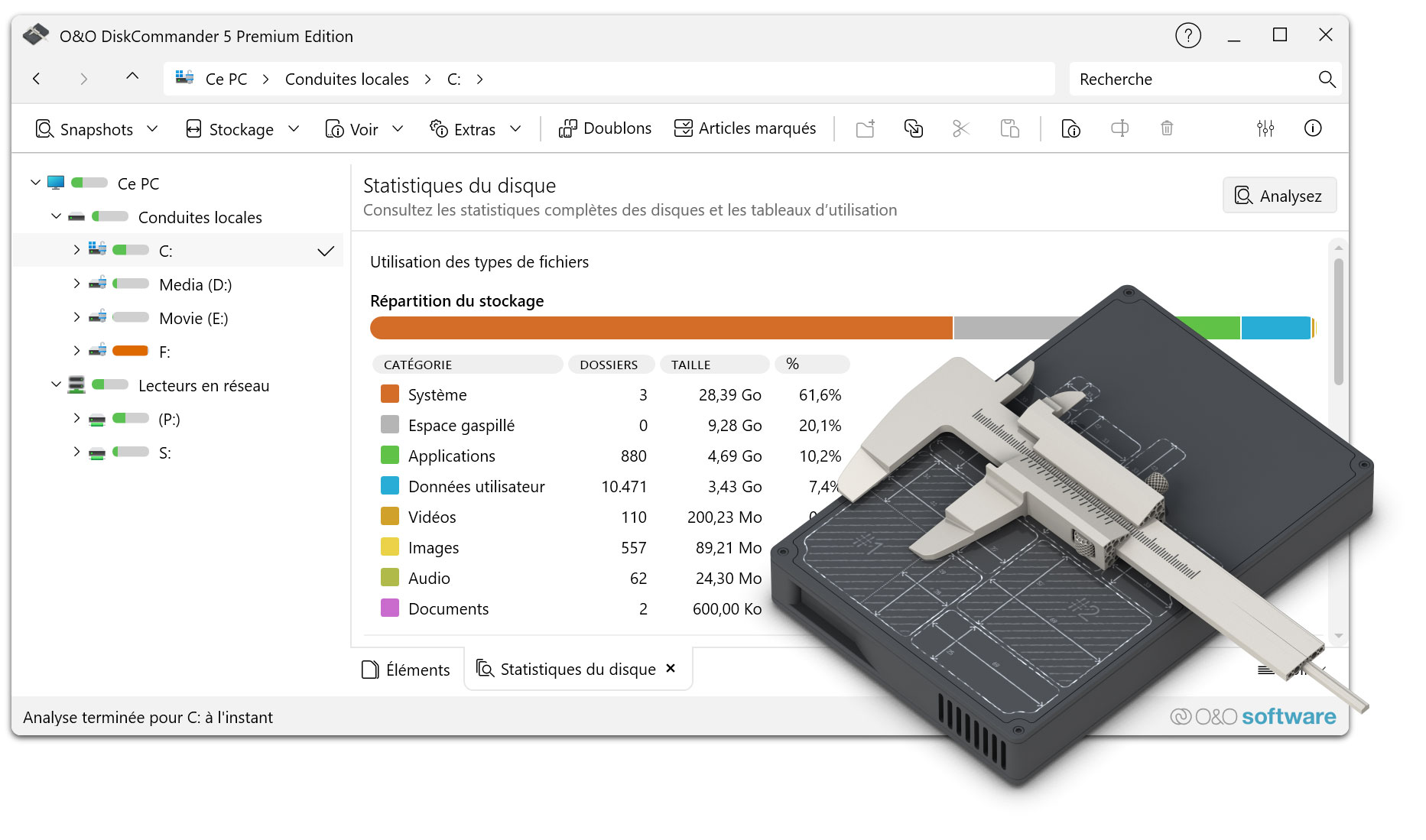
  • File Type Usage Tab
    • New main navigation tab displaying grouped statistics and analysis on disk usage by file type categories (Images, Videos, Audio, Documents, Apps, System, User Data)
    • Live updates during analysis
    • Full localization support
  • Context-Sensitive Online Help
    • Access via F1 key or help button
    • Displays documentation relevant to the current view or active tab
  • Paste Security for Read-Only Volumes
    • Prevents pasting files into read-only volumes such as mounted disk images, backup volumes, or analysis snapshots
  • Password-Protected Disk Image Support
    • Added password dialog for password-protected disk images
  • Tree Map Double-Click Navigation
    • Double-click folders in the Tree Map to navigate into them
    • Double-click files to open them
    • Intuitive navigation similar to File Explorer

Changed:

  • Tree Map Accessibility Improvements
    • Improved color palette with higher contrast per level
    • Dark mode adaptation
    • WCAG-compliant text contrast
  • UI Terminology Updates
    • “Statistics” replaces “Storage”
    • “Overview” replaces “Disk statistics” across the UI and localizations
  • Scan Controls and Status Display
    • Updated scan controls and header buttons
    • Improved reflection of current state and background activity
  • Memory Management
    • Optimized internal memory management

Fixed:

  • Fixed Open Files enumeration where file handles were skipped
  • Fixed memory leak in display logic
  • Paste, move, and delete operations now properly check deletable/moveable status of marked items
  • Warning is shown if only a subset of selected items can be processed
  • Status bar and file lists now correctly update after background actions and navigation
  • Various UI glitches fixed in Tree Map, File Type Usage, and other views

Info:

  • Compatible with Windows 10 and Windows 11; x86, x64, and ARM architectures
  • Available in German, English, French, Italian, Spanish, Russian, Japanese, and Simplified Chinese

Version 5.0

5.0.1018 – released on 01/21/2026

Added:

  • Virtual disk support
    • Analysis of VHD/VHDX disk images and O&O DiskImage files without mounting
    • Copy/paste to extract files from backups
  • Open Files
    • Display of all currently opened/locked files incl. Process Information
    • Filtering by Drive/Folder
    • Context menu actions for file management
  • Analysis comparison
    • Comparison of two disk analyses side by side
    • Visual change indicators: added, deleted, changed, unchanged
  • File management
    • Rename files and folders directly in List View (F2 or long click)
    • Display of SHA1 and SHA256 hash values for integrity check and duplicate detection
  • Views & Visualization
    • Custom View Modes: Details, Small/Medium/Large Tiles, Icons
    • Thumbnail previews for image files (48×48 to 256×256) in tile and icon views
    • File type usage display with breakdown (images, videos, audio, documents, apps, system, user data)
  • Analysis & Operation
    • Analysis queue management for multiple analyses incl. intelligent demolition dialog
    • Automatic analysis start when switching to statistics views without data
    • Incremental statistics: Live results during the scan (configurable refresh intervals)
    • Disk information control with capacity, file counts, fragmentation status, and hardware info (WMI)

Optimized:

  • Faster application startup performance
  • Optimized marking/demarking operations for large amounts of files
  • Improved hash calculation performance for faster duplicate detection

Modified:

  • User Interface
    • Consistent and improved terminology throughout the application
    • Improved menu organization and structure for easier navigation
    • Menu-driven access to tab control and view switching for better findability
    • Improved tab scrolling behavior for overflow tabs
    • Advanced header with additional features and controls
  • Configuration & Settings
    • New Duplicate Detection Configuration Options (Customizable Search Criteria)
  • Architecture & Code Quality
    • Improved management of concurrent analysis operations to avoid conflicts
    • Improved file category classification system with more accurate type recognition

Info:

  • Compatible with Windows 10 and Windows 11; x86 and x64 architecture
  • Available in German, English, French, Italian, Spanish, Russian, Japanese and Chinese (Simplified)

Version 4.5

4.5.1364 – published on 04/18/2024

Added:

  • Available as an installation version alongside the previous Portable application
  • Optimization of analysis performance when searching over a large number of files
  • Revision of the user interface
  • Simplified navigation in the tabs
  • Menu items restructured

Fixed:

  • Wrong icon in context menus
  • Possible crash with special access permissions to directories
  • Various small bugs

Info:

  • Available in German, English and French

Version 4.0

4.0.1363 – released on 09/26/2023

Added:

  • Display of all selected elements in your own view
  • Toolbar for faster navigation
  • Menu for direct access to evaluations
  • View menu restructured
  • Security prompt when deleting files
  • Settings for security prompt when deleting files
  • Settings for Considering Removable Drives and Drives That Are Not Ready
  • Deletion of duplicates only possible via marked files
  • Automatic detection of connection states of network drives

Fixed:

  • Copying file types caused a crash
  • View optimized for statistics overview

Info:

  • Available in German, English and French

4.0.1362 – released on 03/29/2023

Fixed:

  • Fixed error when pasting into the address bar from the clipboard
  • Fixed tagging for duplicates
  • Duplicate search possible on the entire computer
  • Fixed a bug when starting when transferring data to the Notepad
  • Fixed issue with mapped drives when starting Windows
  • Minor layout adjustments
  • Typos corrected in some languages

Info:

  • Available in German, English and French

4.0.1361 – Published on 03/14/2023

Info:

  • Analysis of directories, drives, drive groups or the entire computer
  • Possibility to save the analysis results in order to be able to analyze the directory structure even without a drive
  • New UI with explorer-like navigation
  • In-depth statistics
  • Tree map for graphical representation of the space consumption of directories and files
  • Prediction of whether and when the storage space will be used up with current constant development
  • Search for files and directories
  • Finding Duplicates
  • Marking files across directory and partition boundaries
  • Shell Operations
  • Batch processing of files and directories
  • Cloud Files: Consideration of Microsoft OneDrive Files
  • Available in German, English and French

About us Newsletter For Partners Contact
Our Products Order Downloads Protecting Your Security - Securing Your Privacy
Support FAQ Platform Status News & Releases
Social Commitment Press Releases O&O Labs The O&O Group
© 1997-2026 O&O Software GmbH, Berlin
Privacy Policy Terms & Conditions EULA Cancel subscriptions Imprint
