Your storage. Your overview.
There are collecting passions that are fun. Collecting files that you no longer need will cost you storage space and eventually money – if you need to buy new hard drives. To ensure that finding and cleaning up the storage space wasters does not become a time-consuming torture, we have developed O&O DiskCommander for you.
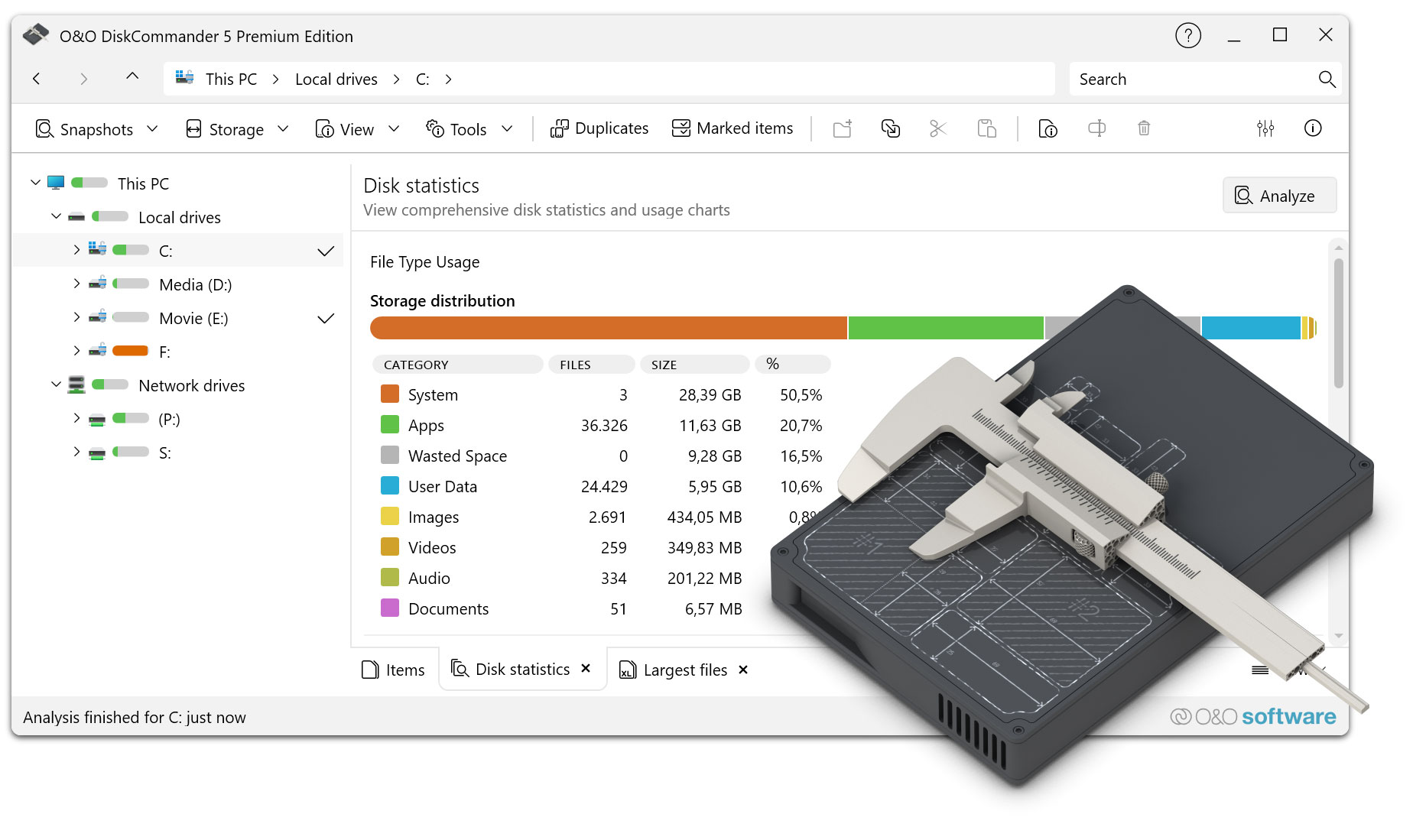
You will be amazed at how much space you gain once you have freed yourself from superfluous ballast. O&O DiskCommander shows you in clear lists and diagrams which files take up how much space – on your home PC as well as on external data carriers or in the network. Instead of clicking through countless folders, you can immediately see where your storage capacity actually is: in large individual files, project directories that have grown over the years, forgotten downloads or data stocks that have been stored several times. Once the superfluous files and the biggest wasters of space have been identified, you can get rid of them quickly and conveniently. This allows you to keep track of your data, keep things tidy and save yourself the expense of additional storage media.
O&O DiskCommander is the successor to our successful O&O DiskStat product range.
The detective against memory guzzlers – now also for data carrier structures and backups
O&O DiskCommander is the detective against memory guzzlers and at the same time a professional analysis tool for data carrier structures. With just a few simple steps, you can get a quick, reliable overview of the usage of your drives – plus detailed insights into hard drives, partitions and file systems (e.g. NTFS and FAT). This makes O&O DiskCommander not only suitable for tidying up, but also for targeted testing and diagnosis, for example in the case of complex data carrier layouts or memory allocations that are difficult to trace.
The interface is deliberately based on Windows Explorer and thus immediately looks familiar: You navigate intuitively through drives and directories, check details and compare memory consumption without having to familiarize yourself with a new logic first. At the same time, O&O DiskCommander goes a decisive step further than the Explorer, because it not only displays, but also makes it understandable: Which areas are growing particularly strongly, which file types dominate, and where can the most memory be reclaimed with little effort.
Visualize instead of searching
O&O DiskCommander makes data volumes understandable. Structured lists, sorting, and graphical evaluations allow you to see at a glance which folders are taking up the most memory, where large files are concentrated, and which areas are particularly suitable for cleanup. In this way, “hard drive full” becomes a clear decision as to where it is really worthwhile to clean up – and which data is better to archive, move or permanently remove.
Analyze without risk
If desired, O&O DiskCommander works purely on an investigative basis: Storage media can be checked without changing content. This gives you maximum control – ideal for sensitive systems, production environments or data carriers that need to be assessed before taking any action.
For added security, analysis results can be exported and imported again later. This is particularly practical when analyses are to be documented, compared or shared within the team.
Backup check without restore: Analyze O&O DiskImage backups directly
One of the most important new features in O&O DiskCommander is the direct analysis of O&O DiskImage backups. You open backup images like a disk and check their contents without having to start a full restore. This allows files, folder structures and system layouts to be quickly verified in image files – saving time and without requiring additional storage through restores.
- Open backup images without restoring
- Analyzing File and Folder Structures in DiskImage Backups
- Check stored data and system layouts in image files
- Use backups for validation and documentation
This makes O&O DiskCommander the ideal companion for O&O DiskImage – especially for analysis, testing and troubleshooting tasks.
Find duplicates – consistently reduce memory hogs
It is not uncommon for the memory consumption to be less due to individual large files than to multiple stored databases. O&O DiskCommander reliably detects duplicates and helps to quickly track down redundant files. This not only frees up space, but also reduces clutter in project, photo or archive folders.
Clean up quickly – with control
To ensure that tidying up is just as efficient as finding, O&O DiskCommander supports convenient actions directly from the analysis. As soon as the biggest memory hogs have been identified, files can be moved, copied or deleted in a targeted manner without having to open each folder individually and sort it manually. If desired, these actions can be logged in detail so that it is always possible to trace what was processed and when. This keeps even larger cleanups clear and controllable.
In addition, O&O DiskCommander can warn you as soon as a defined storage threshold is reached – so that bottlenecks do not occur unexpectedly.
Batch processing for files and directories – even across borders
Batch processing is particularly practical: You mark several files and directories even across directory and drive boundaries and execute the desired operation in a single pass. To ensure that everything runs as smoothly as possible, rules can be set for how to handle existing files and how the program reacts if errors occur during a process. This means that the process continues reliably even with large amounts of data without you having to intervene constantly.
Create order – locally, externally and in the network
In the end, O&O DiskCommander ensures that “hard drive full” is no longer a mystery, but a clearly solvable problem. They see what really eats up space, consciously decide what needs to stay, and create space where it is most urgently needed – whether on private PCs, on work computers, on external data carriers or in network environments.
Optimized for modern Windows systems
O&O DiskCommander is compatible with Windows 10, Windows 11 and Windows Server up to 2025 and is therefore ideally suited for modern working environments and professional IT scenarios.
Advantages at a glance
- Quick overview of drive usage through lists and charts
- Intuitive operation in the style of Windows Explorer
- Identify memory hogs in a targeted manner and clean them up immediately
- Batch processing across directory and drive boundaries
- Optional logging of copying, moving, and deletion operations
- Configurable behavior on existing files and errors occurring
 30-day money back guarantee
Included in the O&O ToolBox – for €59.90 per year
30-day money back guarantee
Included in the O&O ToolBox – for €59.90 per year