• Backup & transfer data
      • O&O DiskImage Professional data backup for your PCs
      • Rescue data & systems
      • O&O DiskRecovery Professional data recovery made easy
      • O&O BlueCon Disaster recovery when a pc or server no longer starts
      • PC Migration Windows 11
      • Migration Kit for Windows 11 The Easy PC Migration
      • Optimize systems
      • O&O Defrag Speed up your Windows PC
      • O&O DiskCommander Disk Analysis & Backup Testing
      • Cloud solutions
      • O&O Syspectr Free IT management solution from the cloud
      • O&O FileDirect Send files. Easily. Securely.
      • Protect data & systems
      • O&O SafeErase Secure data deletion
      • Freeware
      • O&O ShutUp10++ Antispy tool for Windows 10 and 11
      • O&O RegEditor Editing the Windows Registry
      • O&O AppBuster Bust Apps you do not want
      • O&O Lanytix Quick and easy Network Analysis in the LAN
      • O&O DeskInfo All important system information directly on the desktop
      • NEW: O&O ToolBox Our top products in
        a package at a special price!
      • View all products Discover all our tools for Windows
      • Downloads Get installation and portable applications
      • O&O Blog Stay up-to-date with our blog
      • Corporate Solutions Benefits for your company
      • Protect Enterprise Data
      • O&O DiskImage Backup solution for your business
      • O&O DiskImage Enterprise Data backup and system recovery at industrial levels
      • Productivity Boost
      • O&O Defrag Maximum performance for your Windows servers and PCs
      • Enterprise-Wide Data Recovery
      • O&O DiskRecovery Professional data recovery at the push of a button
      • O&O BlueCon The recovery system when a computer or server no longer starts
      • Protect Your Enterprise Data
      • O&O SafeErase Secure data deletion for critical business data
      • Freeware
      • O&O ShutUp10++ Compliance use of Windows in businesses
      • Your IT Management in the Cloud
      • O&O Syspectr Remote Monitoring and Management for Windows
      • O&O Blog Stay up-to-date with our blog
      • O&O PowerPack Enterprise The complete solution for your servers and PCs at a bargain price!
    • View all products >>>
      • Ressources
      • Documentation Documents related to O&O products
      • User's guides online Read manuals online
      • Downloads Download archive
      • Whitepapers Studies and whitepapers
      • FAQ Frequently asked questions
      • First aid First aid in the event of data loss
      • Get support
      • Overview Our service offers
      • Registration Register your O&O product
      • Trial users Support for trial users
      • Registered customers Support for registered customers
      • License recovery Resend your O&O license
      • Partner
      • O&O Partner Program Your advantages as an O&O Partner
      • O&O Partners Authorized O&O Partners in your region
      • Company
      • About us Leading manufacturer of system tools
      • Product releases List release dates and versions
      • The O&O Group Made in Berlin. Made in Germany.
      • Team Our management team
      • Contact us How to contact O&O
    • Contact

Business Private Partners

O&O Lanytix

Simple network analysis in the LAN
Download for free

Freeware

O&O Lanytix - Simple network analysis in the LAN
Windows 10 Windows 11
Looking for a backup solution? Find out more here.
  • Overview
  • Features
  • Screenshots
  • Support
  • What’s New

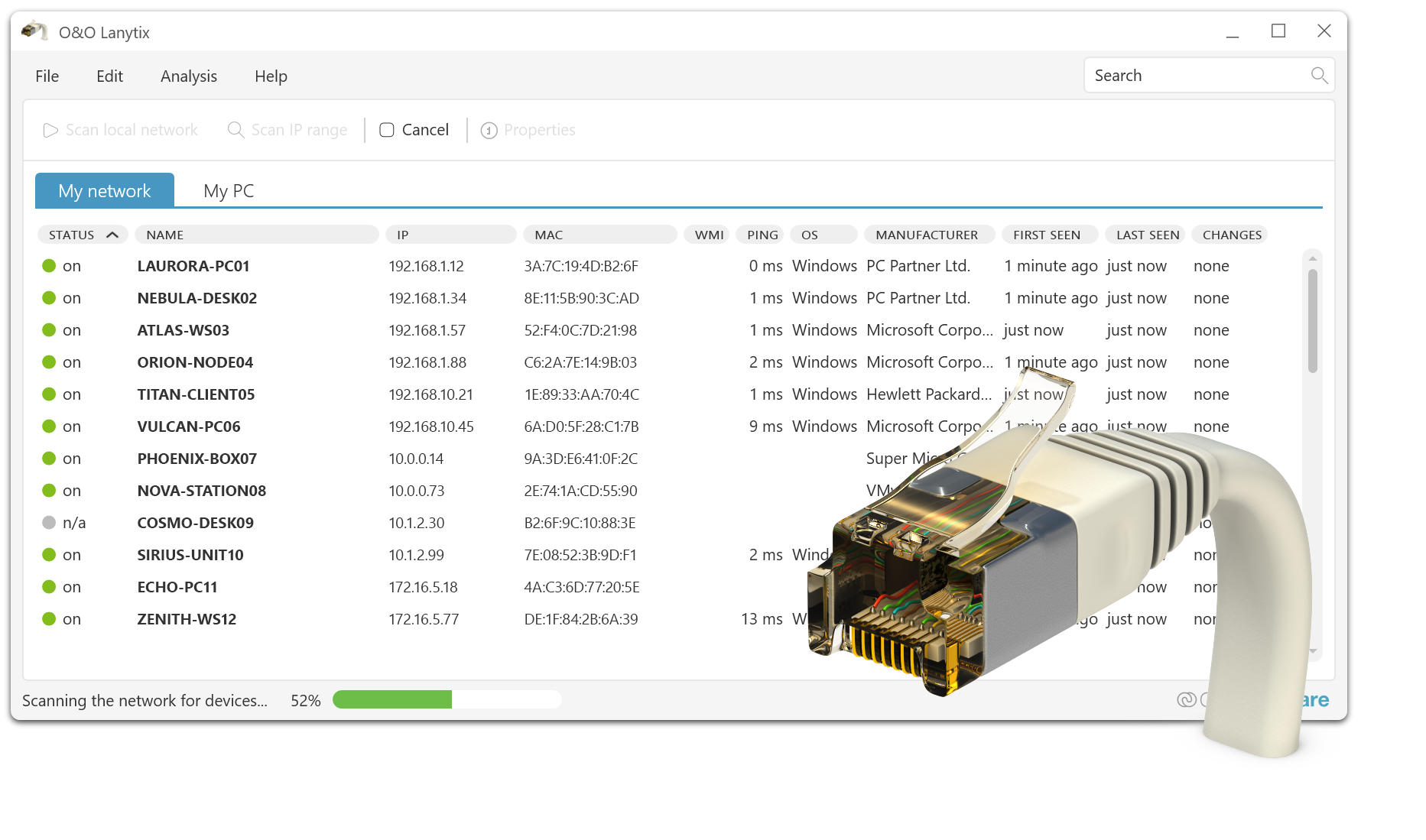
Find and discover devices on the local area network (LAN)

When a network grows, transparency becomes a prerequisite: O&O Lanytix provides you with a clear overview of devices, structures and possible anomalies in your environment in the shortest possible time. Whether it’s a quick inventory, targeted troubleshooting or a simple security check – with just a few clicks, you can see what is active in the network and where action is needed.

The following list of functions shows how O&O Lanytix supports you in efficiently analyzing networks, understanding changes and isolating problems more quickly.

Network Scan & Device Discovery

  • Automatic scan to detect active devices and systems
  • Quick inventory in the local network

Inventory

  • Capture PCs, servers, routers, switches, access points, printers, NAS, and other IP devices
  • Clear device list for documentation and control

Device information

  • Display of hostname, IP address and MAC address
  • Vendor/vendor detection (where available)
  • Detection of basic system and network parameters (depending on the device)

Topology & Visualization

  • Clear representation of the network structure
  • Quick recognition of correlations and abnormalities

IP and subnet analysis

  • Analysis of IP ranges and network segments
  • Support in planning, control and fault diagnosis

Service & Port Analysis

  • Detection of reachable services
  • Display of typical open ports for configuration and security check

Detection of unknown devices

  • Detect new or unexpected devices on the network
  • Helpful for basic security checks and inventory maintenance

Troubleshooting & Diagnostics

  • Practical functions for fast network troubleshooting
  • Assistance with accessibility and connectivity issues

Documentation & Export

  • Export of scan results for reporting and sharing
  • Useful for audits, support, and network documentation

Detecting Repeatable Scans & Changes

  • Regular scans to visualize network changes
  • Comparison of devices/statuses for quick deviation detection

Easy to use

  • Intuitive interface for fast results
  • Suitable for admins, support and advanced users
About us Blog For Partners Contact
Our Products Order Downloads Protecting Your Security - Securing Your Privacy
Support FAQ Platform Status News & Releases
Social Commitment Press Releases O&O Labs The O&O Group
© 1997-2026 O&O Software GmbH, Berlin
Privacy Policy Terms & Conditions EULA Cancel subscriptions Imprint
