
• Backup & transfer data
      • O&O DiskImage Professional data backup for your PCs
      • Rescue data & systems
      • O&O DiskRecovery Professional data recovery made easy
      • O&O BlueCon Disaster recovery when a pc or server no longer starts
      • PC Migration Windows 11
      • Migration Kit for Windows 11 The Easy PC Migration
      • Optimize systems
      • O&O Defrag Speed up your Windows PC
      • O&O DiskCommander Disk Analysis & Backup Testing
      • Cloud solutions
      • O&O Syspectr Free IT management solution from the cloud
      • O&O FileDirect Send files. Easily. Securely.
      • Protect data & systems
      • O&O SafeErase Secure data deletion
      • Freeware
      • O&O ShutUp10++ Antispy tool for Windows 10 and 11
      • O&O RegEditor Editing the Windows Registry
      • O&O AppBuster Bust Apps you do not want
      • O&O Lanytix Quick and easy Network Analysis in the LAN
      • O&O DeskInfo All important system information directly on the desktop
      • NEW: O&O ToolBox Our top products in
        a package at a special price!
      • View all products Discover all our tools for Windows
      • Downloads Get installation and portable applications
      • O&O Blog Stay up-to-date with our blog
      • Corporate Solutions Benefits for your company
      • Protect Enterprise Data
      • O&O DiskImage Backup solution for your business
      • O&O DiskImage Enterprise Data backup and system recovery at industrial levels
      • Productivity Boost
      • O&O Defrag Maximum performance for your Windows servers and PCs
      • Enterprise-Wide Data Recovery
      • O&O DiskRecovery Professional data recovery at the push of a button
      • O&O BlueCon The recovery system when a computer or server no longer starts
      • Protect Your Enterprise Data
      • O&O SafeErase Secure data deletion for critical business data
      • Freeware
      • O&O ShutUp10++ Compliance use of Windows in businesses
      • Your IT Management in the Cloud
      • O&O Syspectr Remote Monitoring and Management for Windows
      • O&O Blog Stay up-to-date with our blog
      • O&O PowerPack Enterprise The complete solution for your servers and PCs at a bargain price!
    • View all products >>>
      • Ressources
      • Documentation Documents related to O&O products
      • User's guides online Read manuals online
      • Downloads Download archive
      • Whitepapers Studies and whitepapers
      • FAQ Frequently asked questions
      • First aid First aid in the event of data loss
      • Get support
      • Overview Our service offers
      • Registration Register your O&O product
      • Trial users Support for trial users
      • Registered customers Support for registered customers
      • License recovery Resend your O&O license
      • Partner
      • O&O Partner Program Your advantages as an O&O Partner
      • O&O Partners Authorized O&O Partners in your region
      • Company
      • About us Leading manufacturer of system tools
      • Product releases List release dates and versions
      • The O&O Group Made in Berlin. Made in Germany.
      • Team Our management team
      • Contact us How to contact O&O
    • Contact

Business Private Partners

O&O Lanytix

Simple network analysis in the LAN
Download for free

Freeware

O&O Lanytix - Simple network analysis in the LAN
Windows 10 Windows 11
Looking for a backup solution? Find out more here.
  • Overview
  • Features
  • Screenshots
  • Support
  • What’s New

O&O Lanytix FAQ

1. What is O&O Lanytix used for?
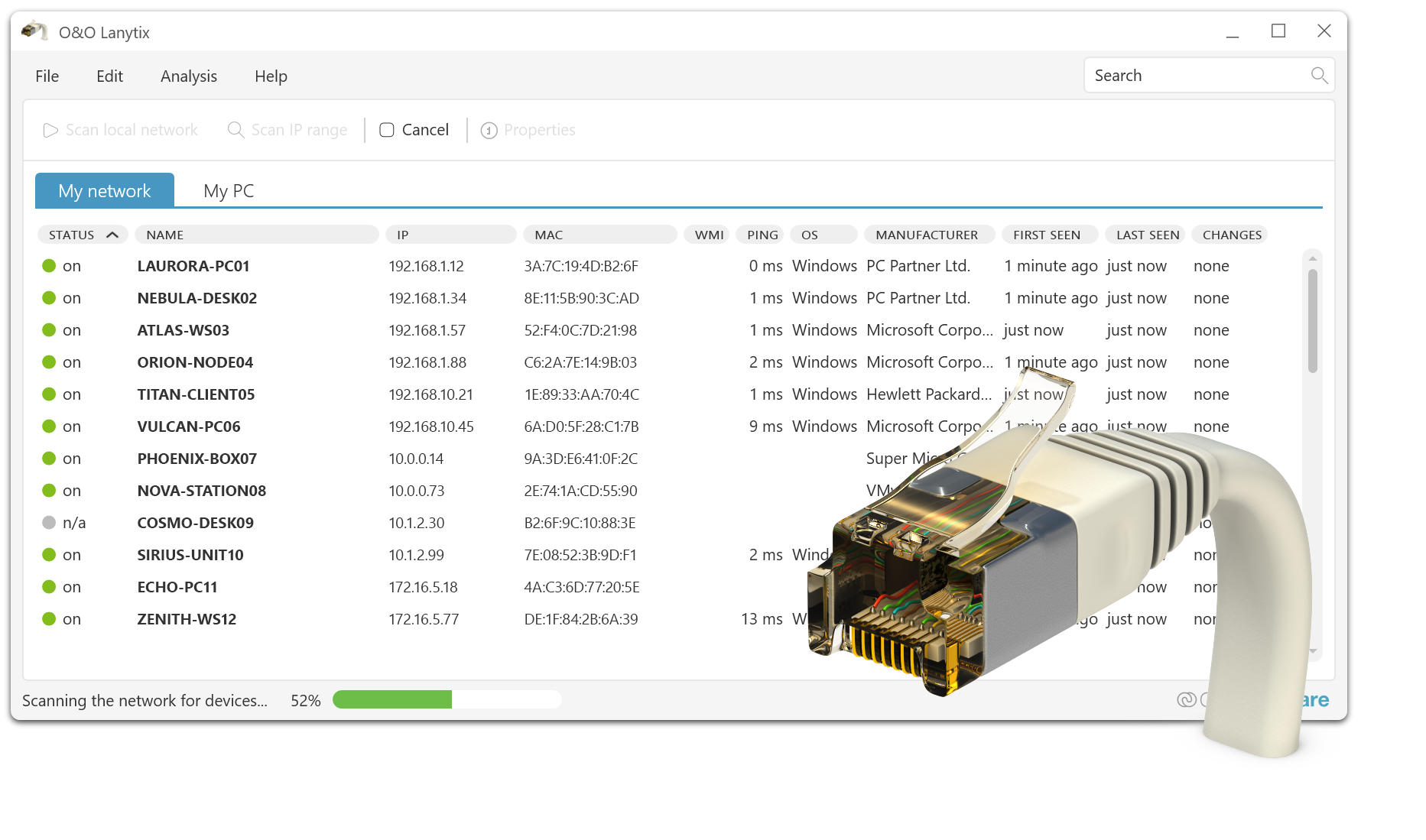
O&O Lanytix helps you to quickly overview your network, identify devices and find typical causes of network problems. It is suitable for inventory, security checks and troubleshooting – from the home network to the corporate environment.

2. What devices can O&O Lanytix find in my network?
O&O Lanytix usually recognizes all IP-based devices that can be reached in your network, e.g. PCs, servers, routers, switches, access points, printers, NAS, cameras and other network components.

3. Do I have to have administrator rights to use O&O Lanytix?
Basic scans on the local network often do not require special rights. Advanced queries (e.g., more detailed information depending on the system/environment) may require administrator privileges or corresponding network privileges.

4. Does O&O Lanytix also recognize devices in other subnets or VLANs?
O&O Lanytix can detect devices in accessible IP ranges. Whether other subnets or VLANs are visible depends on your network structure, routing rules, and firewall/switch configuration.

5. Can O&O Lanytix display open ports or services?
Depending on the scanning options, O&O Lanytix can make accessible services or typical open ports visible. This helps with configuration checks and the identification of possible security risks.

6. Does the scan affect my network or the devices it finds?
The scan is basically designed to detect devices in the network without changing their data. In very sensitive environments, however, we recommend testing scans first in a maintenance window or with a limited IP range.

7. Why can’t I see all the devices that are present on the network?
Common reasons include firewall rules, disabled responses to network queries, devices on standby, disconnected subnets/VLANs, lack of routing, or limited permissions. Also, check that the correct IP range is being scanned.

8. Can I export or document the scan results?
Yes, the results can be exported for documentation and analysis purposes. This is helpful for inventory lists, support cases, audits, or comparison across multiple scans.

9. Can I detect network changes (new devices, changed configurations)?
Repeated scans can reveal changes in the network – e.g. newly added devices or changed reaches. This supports continuous monitoring and troubleshooting.

10. What should I do if an unknown device appears?
Write down the IP and MAC address as well as the vendor identifier, check the assignment in the DHCP server/router and compare it with your inventory list. In corporate environments, we also recommend checking the ports on the switch and controlling access rights.

11. Does O&O Lanytix also work in large corporate networks?
O&O Lanytix is particularly suitable for small to medium-sized networks and structured scanning areas. In very large environments, it is recommended to perform segmented scans (e.g. per subnet/VLAN) to keep results clear and to keep the network load low.

12. How can I contact O&O technical support?
If you need support, you can reach O&O Support here:

Support for registered users:
https://www.oo-software.com/en/support/csupport

Support for trial and freeware versions:
https://www.oo-software.com/en/support/tsupport

End User License Agreement (EULA) for O&O Lanytix

IMPORTANT – PLEASE READ CAREFULLY: This license agreement is a contractual agreement between you (a private or legal entity) and O&O Software GmbH regarding the aforementioned software, which may include program components, media, printed materials, and online or electronic documentation. By installing, copying, or otherwise using the Software, you agree to be bound by the terms of this License Agreement. If you do not agree to the terms of this License Agreement, you may not install or use the Software.

The Software is protected by copyright laws and international copyright treaties, as well as other intellectual property laws and conventions. The software is licensed, not sold.
1. Grant of License

The Software is licensed as follows:

1.1 Installation and Use. O&O grants you the right to install and use the Software and its copies on your computers. The software is in use when it is loaded into volatile memory (e.g. RAM) or installed in permanent memory (e.g. hard drive, CD-ROM, floppy disk) in order to be accessible to end users.

1.2 Backups. You may also make backup copies of the Software if necessary for backup and archival purposes.
2. Description of Other Rights and Restrictions

2.1 Copyright Notices. You may not alter or remove the copyright notices on any copies of the Software.

2.2 Sales. You may make exact and unmodified copies of this software and distribute these copies free of charge only by electronic means (e.g. via Internet sites), provided that: (a) that the Software will be distributed unmodified (enclosing the Software with an installer, wrapper, or similar is an unauthorized modification within the meaning of this Agreement) and in its entirety, including complete user documentation, readme files, copyright and trademark notices, and other intellectual property notices, including this License Agreement, and (b) that such distribution may take place anywhere in the world, except for countries to which the export of software is prohibited (directly or indirectly) by the regulations of the Federal Republic of Germany.

2.3 Prohibition of reverse engineering, decompilation and disassembly. You may not reverse engineer, decompile, or disassemble this Software, except and only to the extent that such activities are expressly permitted by applicable law notwithstanding this limitation.

2.4 Rental. You may not rent, lease or lend the Software.

2.5 Transfer. You may assign all of your rights permanently, provided that the recipient agrees to the terms of this License Agreement.

2.6 Compliance with Applicable Laws. You must comply with all applicable laws regarding the use of software.
3. Termination of the contract

Without affecting all other possible rights, O&O may terminate this License Agreement if you violate the terms of this Agreement. In this case, you need to destroy all copies of the software.
4. Copyrights

All rights to this software and its copies, including but not limited to copyrights, are owned by O&O and its suppliers. All intellectual property rights relating to this Software that may be accessed through the use of the Software are the property of their respective owners and may be protected by applicable law or other conventions and intellectual property rights. This License Agreement does not grant you any rights to use this property. All rights not expressly granted are reserved by O&O.
5. No Warranty

O&O expressly disclaims all warranties for the software. The Software and any related documentation are provided “as is” without warranties of any kind, either express or implied, including, without limitation, implied warranties or merchantability, fitness for a particular purpose, or non-infringement. The entire risk arising from the use or performance of the Software is borne by you.
6. Limitation of Liability

To the maximum extent permitted by applicable law, O&O or its suppliers shall not be liable for any intentional, incidental, indirect, or consequential damages of any kind (including, without limitation, loss of profits, business interruption, loss of business information, or any other pecuniary loss) arising out of the use of the Software, the inability to use the Software, or the support services warranted or not, even if O&O has been informed of the possibility of such damages. O&O’s total liability under this License Agreement shall be limited to the greater of the amount you paid for the Software or to 0.01 Euros; unless you have entered into a maintenance contract with O&O, in which case O&O’s entire liability will be governed by the terms of that contract. Because some states and jurisdictions do not allow the exclusion or limitation of liability, the above limitation may not apply to you.
7. Final Provisions

The contract is governed by German law. The Unified UN Convention on Contracts for the International Sale of Goods (CISG) and the UNIDROIT Factoring Convention of Ottawa are not applicable. Any terms and conditions of yours do not apply. In the event that you are a merchant or do not have a registered office in the Federal Republic of Germany, we agree on the Berlin Regional Court as the competent court for disputes arising from this contract.
8. Contact

If you have any questions about the EULA or would like to contact O&O, please contact us.

O&O Software GmbH,
Bülowstraße 66,
10783 Berlin,
Germany

Tel. +49 (0)30 991 91 62 00
Fax +49 (0)30 991 91 62 99

E-mail: info@oo-software.com
Web:

Last update: 2016-03-09

About us Blog For Partners Contact
Our Products Order Downloads Protecting Your Security - Securing Your Privacy
Support FAQ Platform Status News & Releases
Social Commitment Press Releases O&O Labs The O&O Group
© 1997-2026 O&O Software GmbH, Berlin
Privacy Policy Terms & Conditions EULA Cancel subscriptions Imprint
