• Backup & transfer data
      • O&O DiskImage Professional data backup for your PCs
      • Rescue data & systems
      • O&O DiskRecovery Professional data recovery made easy
      • O&O BlueCon Disaster recovery when a pc or server no longer starts
      • PC Migration Windows 11
      • Migration Kit for Windows 11 The Easy PC Migration
      • Optimize systems
      • O&O Defrag Speed up your Windows PC
      • O&O DiskCommander Disk Analysis & Backup Testing
      • Cloud solutions
      • O&O Syspectr Free IT management solution from the cloud
      • O&O FileDirect Send files. Easily. Securely.
      • Protect data & systems
      • O&O SafeErase Secure data deletion
      • Freeware
      • O&O ShutUp10++ Antispy tool for Windows 10 and 11
      • O&O RegEditor Editing the Windows Registry
      • O&O AppBuster Bust Apps you do not want
      • O&O Lanytix Quick and easy Network Analysis in the LAN
      • O&O DeskInfo All important system information directly on the desktop
      • NEW: O&O ToolBox Our top products in
        a package at a special price!
      • View all products Discover all our tools for Windows
      • Downloads Get installation and portable applications
      • O&O Blog Stay up-to-date with our blog
      • Corporate Solutions Benefits for your company
      • Protect Enterprise Data
      • O&O DiskImage Backup solution for your business
      • O&O DiskImage Enterprise Data backup and system recovery at industrial levels
      • Productivity Boost
      • O&O Defrag Maximum performance for your Windows servers and PCs
      • Enterprise-Wide Data Recovery
      • O&O DiskRecovery Professional data recovery at the push of a button
      • O&O BlueCon The recovery system when a computer or server no longer starts
      • Protect Your Enterprise Data
      • O&O SafeErase Secure data deletion for critical business data
      • Freeware
      • O&O ShutUp10++ Compliance use of Windows in businesses
      • Your IT Management in the Cloud
      • O&O Syspectr Remote Monitoring and Management for Windows
      • O&O Blog Stay up-to-date with our blog
      • O&O PowerPack Enterprise The complete solution for your servers and PCs at a bargain price!
    • View all products >>>
      • Ressources
      • Documentation Documents related to O&O products
      • User's guides online Read manuals online
      • Downloads Download archive
      • Whitepapers Studies and whitepapers
      • FAQ Frequently asked questions
      • First aid First aid in the event of data loss
      • Get support
      • Overview Our service offers
      • Registration Register your O&O product
      • Trial users Support for trial users
      • Registered customers Support for registered customers
      • License recovery Resend your O&O license
      • Partner
      • O&O Partner Program Your advantages as an O&O Partner
      • O&O Partners Authorized O&O Partners in your region
      • Company
      • About us Leading manufacturer of system tools
      • Product releases List release dates and versions
      • The O&O Group Made in Berlin. Made in Germany.
      • Team Our management team
      • Contact us How to contact O&O
    • Contact
    • Newsletter

Business Private Partners

O&O RegEditor

Editing the Windows Registry

Freeware

Download for free
O&O RegEditor - Editing the Windows Registry
Windows 10 Windows 11
Looking for a backup solution? Find out more here.
  • Overview
  • Features
  • Screenshots
  • Support
  • What’s new

All functions of O&O RegEditor at a glance

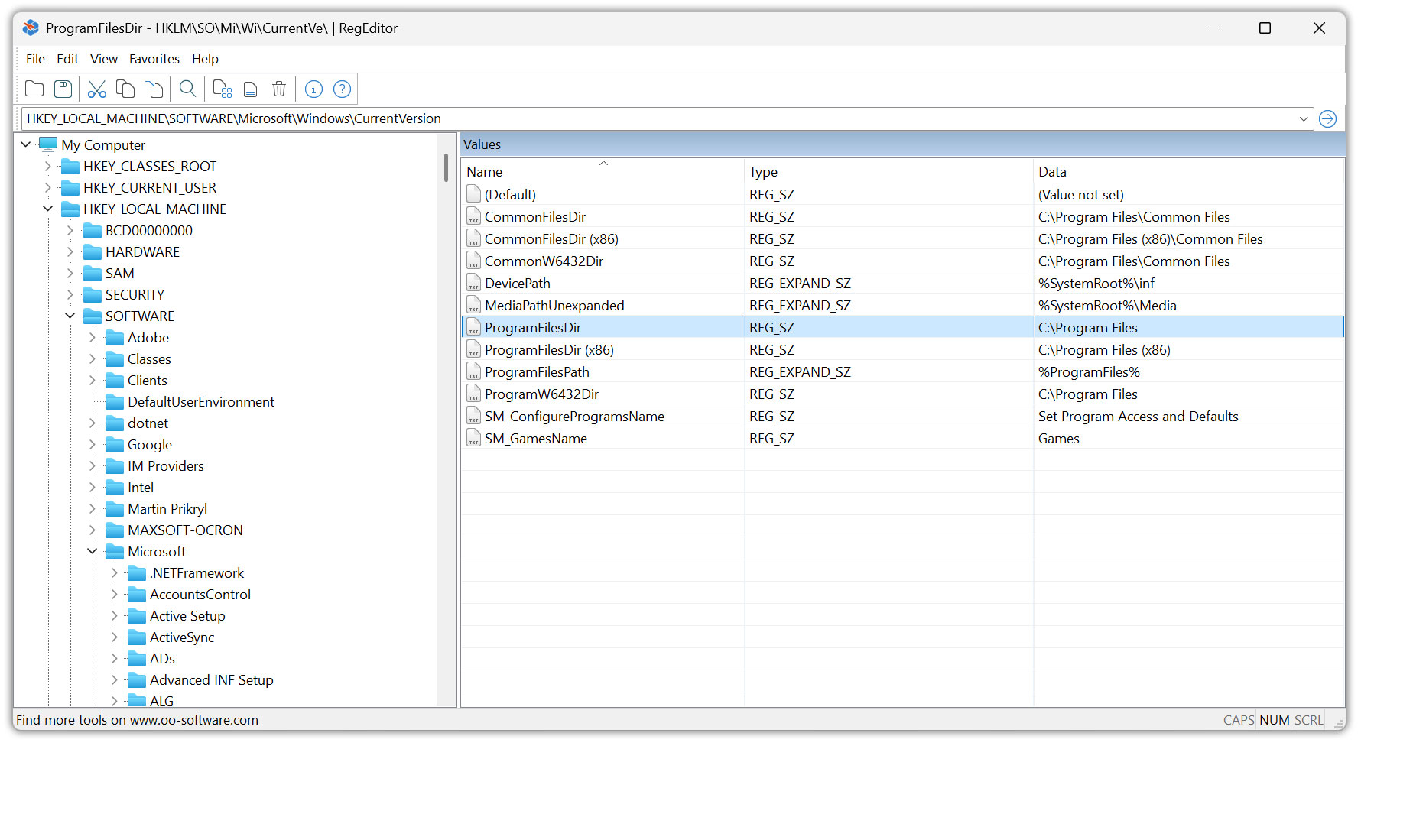
O&O RegEditor is the convenient alternative to Windows’ own registry editor and offers you significantly more control, overview and ease of use when managing the Windows registry. Whether it’s targeted changes to registry values, quick searches, copying complete key structures or working with favorites – O&O RegEditor simplifies typical administrator tasks considerably. The following list of features and functions shows you all the ways in which O&O RegEditor makes working on the Windows registry faster, more secure and more efficient.

General features

  • Editing the Windows Registry Without Additional Windows Tools
  • Support for all common registry hives and branches (e.g. HKEY_LOCAL_MACHINE, HKEY_CURRENT_USER)
  • Display of keys, subkeys and values in a clear tree structure
  • Display and edit of all common value types (e.g. string, expandable string, DWORD, QWORD, binary, multi-string)
  • Quickly navigate through registry paths
  • Direct access to frequently used areas of the registry
  • Uniform operating logic for typical registry tasks
  • Optimized for administrators, power users, and support assignments

Create, edit and delete

  • Creating new registry keys
  • Creating new registry values in existing keys
  • Edit existing key and value names
  • Edit value contents for all supported data types
  • Deleting individual registry values
  • Delete complete keys including subkeys
  • Secure confirmation queries for critical deletion actions
  • Processing even with complex key structures

Search and find

  • Convenient search function via keys, value names and contents
  • Hit display as result list for quick selection
  • Jump directly from the search hit to the exact registry position
  • Resume the search without re-entering
  • Search in sub-areas or across entire hives
  • Search for exact terms and substrings
  • Quick navigation between multiple hits

Copy, paste, and duplicate

  • Copying complete registry keys including subkeys
  • Copying individual registry values including data type and content
  • Pasting copied keys into other paths
  • Pasting copied values into other keys
  • Duplicating entire key structures to quickly reproduce configurations
  • Maintaining Structure and Hierarchy in Copy Operations
  • Quickly transfer settings between similar registry areas

Favorites and quick access

  • Create your own favorites for registry paths
  • Manage and maintain a Favorites list
  • Fast Jump to Saved Registry Positions
  • Preset Favorites for Frequently Used Registry Keys
  • Rename and organize favorites
  • Importing Favorites to Inherit Existing Collections
  • Export favorites for sharing or saving
  • Restore favorites after reinstallation or system change

Import and export

  • Import of REG files to apply registry changes
  • Export of selected keys as a REG file
  • Export of individual values or complete key branches
  • Quickly create backup REG files before changes
  • Export of the entire registry in XML format
  • Use of exports to document system states
  • Inherit exports to restore defined configurations

Working comfort and operation

  • Clear interface for fast work
  • Context menus for the most important registry actions
  • Keyboard-friendly operation for fast admin workflows
  • Clearly structured dialogs for value types and content
  • Display of paths and key labels for better orientation
  • Reduction of typical sources of error through guided operation
  • Quickly switch between tree view and detail view

Portable use

  • Portable version without installation
  • Can be started directly from portable storage media (e.g. USB stick)
  • Suitable for use on multiple PCs without setup
  • Ideal for support calls, admin toolkits and emergency environments
  • No permanent changes to the system due to installation routines

Security and control

  • Working with Registry Structures Without Manual Detours
  • Suitable for controlled changes to system and user areas
  • Support for secure backup before changes through export functions
  • Reduction of operating errors through clear displays and dialogs
  • Suitable for structured, traceable registry adjustments

Application scenarios

  • Troubleshooting and troubleshooting through targeted registry adjustments
  • Standardization of configurations via export/import
  • Quick access to support-relevant registry offices
  • Migration of settings between systems (e.g. via REG exports)
  • Documentation of system states for analysis and comparison
About us Newsletter For Partners Contact
Our Products Order Downloads Protecting Your Security - Securing Your Privacy
Support FAQ Platform Status News & Releases
Social Commitment Press Releases O&O Labs The O&O Group
© 1997-2026 O&O Software GmbH, Berlin
Privacy Policy Terms & Conditions EULA Cancel subscriptions Imprint