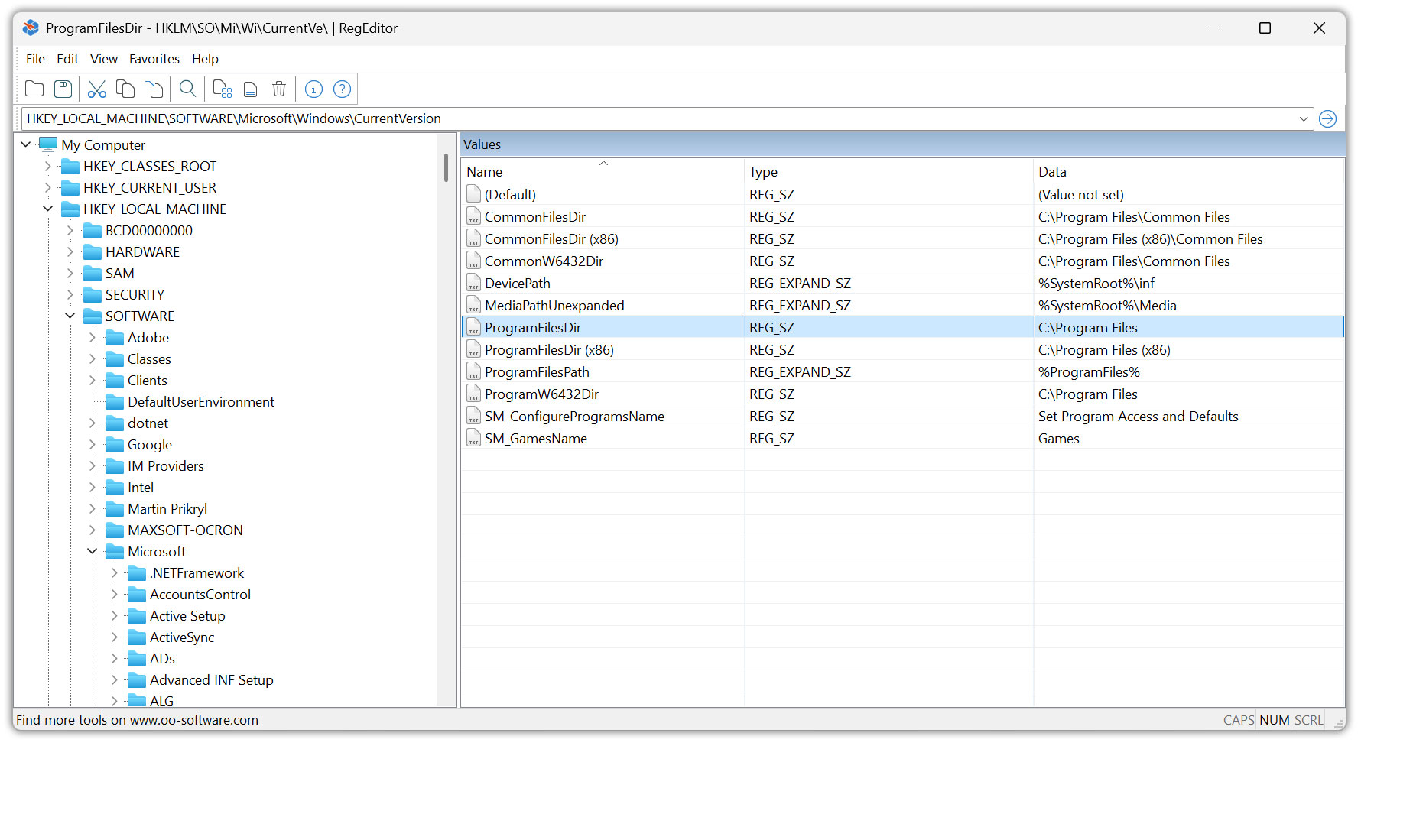
O&O RegEditor is a free and powerful alternative to the Registry Editor included with Windows. The program was developed specifically for administrators, developers, power users, and technical support professionals. It makes it easier to browse, analyze, and edit the Windows Registry and provides a modern user interface, powerful search functions, and quick access to frequently used Registry areas.
O&O RegEditor is available as a portable application and does not need to be installed. Program settings are stored in a portable configuration file. This allows the program to be started directly from a USB flash drive, for example, and used on different systems with a consistent configuration.
The user interface supports both light and dark themes. O&O RegEditor can automatically follow the Windows appearance setting or be permanently set to a light or dark theme. Thanks to High-DPI support, icons and toolbars are displayed sharply even on high-resolution screens.
O&O RegEditor is available in dedicated versions for 32-bit and 64-bit Windows systems. The application can also be run on ARM-based Windows devices. It is ARM-compatible, but not ARM-native.
1. Which Windows versions and system architectures are supported by O&O RegEditor?
O&O RegEditor is available for Windows 10 and Windows 11. Dedicated versions are provided for 32-bit and 64-bit Windows systems. O&O RegEditor can also be used on ARM-based Windows devices. The application is ARM-compatible, but not ARM-native. Thanks to its support for high-resolution displays, the program is also suitable for modern devices with High-DPI screens.
2. Is O&O RegEditor free?
Yes. O&O RegEditor is free and can be used at no additional cost.
3. Does O&O RegEditor need to be installed?
No. O&O RegEditor is a portable application and does not need to be installed. The program can be started directly from a USB flash drive, for example, making it particularly suitable for administrators, support assignments, and portable tool collections.
4. Where does O&O RegEditor store its settings?
Program settings are stored in a portable configuration file and are not written to the Windows Registry. Existing settings from an earlier program version are automatically migrated the first time the program is started.
5. What is the difference between O&O RegEditor and Windows RegEdit?
O&O RegEditor offers additional features and more convenient operation than the Registry Editor included with Windows. These include live search, regular expressions, whole-word matching, a results list, copying complete key structures, advanced favorites management, and portable use without installation.
6. Can I create, edit, or delete Registry keys and values with O&O RegEditor?
Yes. O&O RegEditor allows you to create, rename, edit, and delete Registry keys and values. It supports common Registry value types such as strings, expandable strings, DWORD, QWORD, binary, and multi-string values.
7. Does O&O RegEditor support large binary values and multi-line strings?
Yes. Large binary values can be edited in the value editor. Multi-string values of the REG_MULTI_SZ type are also processed correctly when editing and copying.
8. Which search functions does O&O RegEditor offer?
O&O RegEditor searches Registry keys, value names, and value data. Live search displays matching results as you type. Regular expressions, whole-word matching, exact terms, and partial strings are also supported.
9. How are search results displayed?
Registry entries that are found are displayed in a clear results list. From there, you can jump directly to the corresponding location in the Registry and quickly move between multiple matches.
10. Can I export search results?
Yes. Search results can be exported using Save Results As… as a REG file or as a tab-separated text file in TXT format. This allows results to be backed up, documented, or processed outside the program.
11. Can I copy Registry keys and paste them elsewhere?
Yes. O&O RegEditor allows you to copy and paste complete keys and subkeys, including all values they contain. Individual Registry values can also be copied together with their data type and content.
12. Can I create favorites for frequently used Registry paths?
Yes. Registry paths can be saved as favorites and accessed quickly at any time. Preset entries for frequently used Registry keys are also available.
13. Which features are included in favorites management?
Favorites management supports multiple selection, renaming, importing, exporting, and printing. Favorite entries can also be moved up or down and arranged in a custom order.
14. Can I export and re-import Registry areas?
Yes. O&O RegEditor supports the import and export of REG files. Individual keys, complete key branches, or Registry values can be exported for backup and later restoration. The entire Registry can also be exported in XML format.
15. How does O&O RegEditor handle comments in REG files?
When REG files are imported, comment lines beginning with a semicolon are automatically skipped. Quotation marks, escaped backslashes, and different Registry value types are also handled during import.
16. Does O&O RegEditor include a dark mode?
Yes. Under View > Appearance, you can select a light or dark theme. Alternatively, O&O RegEditor can automatically follow the current Windows appearance setting. The theme changes immediately and no restart is required.
17. Does O&O RegEditor support high-resolution displays?
Yes. O&O RegEditor supports High-DPI displays. Icons and toolbars are displayed sharply in different sizes depending on the selected display scaling.
18. How does navigation using the address bar work?
You can enter complete Registry paths directly in the address bar. It also remembers recently used paths and accepts entries prefixed with Computer\ or My Computer\.
19. Is the last opened Registry path saved?
Yes. The last opened key path is saved when the program is closed and automatically restored the next time it is started.
20. Can O&O RegEditor be operated using the keyboard?
Important areas can be operated conveniently using the keyboard. Press Tab to switch the focus between the Registry tree and the value list. Press Enter to open the edit dialog for the selected Registry value.
21. Does O&O RegEditor save the window layout?
Yes. The split between the Registry tree and the value list remains stable when the window is resized. The selected width of the two areas is saved and restored the next time the program is started.
22. Is O&O RegEditor safe to use?
O&O RegEditor works directly with the Windows Registry and uses the standard system mechanisms. Changes should nevertheless be made with appropriate caution, as incorrect Registry entries can affect Windows and installed applications.
23. Can I undo changes made to the Registry?
O&O RegEditor does not provide a general undo function for all Registry changes. Previously exported keys or Registry areas can, however, be imported again. We therefore recommend creating a REG backup of the affected areas before making major changes.
24. What should I consider before modifying the Registry?
Before making major changes, export the affected Registry keys or create a system restore point. Changes to system-relevant keys should only be made when you understand the possible consequences.
25. Does O&O RegEditor require an Internet connection?
No. An Internet connection is not required to browse or edit the Registry. A connection is only needed for online functions, such as checking for updates, opening the O&O website, or accessing support information.
26. Can I use O&O RegEditor on multiple PCs?
Yes. Because it is portable, O&O RegEditor can be started on different PCs without installation. This is particularly useful for administrators, technical support staff, and use on test or maintenance systems.
27. Which languages are available in O&O RegEditor?
O&O RegEditor is available in English and German. The selected display language is saved and automatically restored the next time the program is started.
28. How can I contact O&O Support?
Before making changes to the Windows Registry, you should create a backup of the affected Registry areas and make sure that you can restore them if a problem occurs. Alternatively, we recommend creating a system restore point or a complete system backup before making extensive changes.
O&O expressly points out that changes to the Registry should only be made by experienced users who understand the possible consequences. Incorrect or unsuitable changes can affect the stability of Windows and installed applications, cause system crashes, or prevent Windows from starting correctly. Data loss may also occur.