• Backup & transfer data
      • O&O DiskImage Professional data backup for your PCs
      • Rescue data & systems
      • O&O DiskRecovery Professional data recovery made easy
      • O&O BlueCon Disaster recovery when a pc or server no longer starts
      • PC Migration Windows 11
      • Migration Kit for Windows 11 The Easy PC Migration
      • Optimize systems
      • O&O Defrag Speed up your Windows PC
      • O&O DiskCommander Disk Analysis & Backup Testing
      • Cloud solutions
      • O&O Syspectr Free IT management solution from the cloud
      • O&O FileDirect Send files. Easily. Securely.
      • Protect data & systems
      • O&O SafeErase Secure data deletion
      • Freeware
      • O&O ShutUp10++ Antispy tool for Windows 10 and 11
      • O&O RegEditor Editing the Windows Registry
      • O&O AppBuster Bust Apps you do not want
      • O&O Lanytix Quick and easy Network Analysis in the LAN
      • O&O DeskInfo All important system information directly on the desktop
      • NEW: O&O ToolBox Our top products in
        a package at a special price!
      • View all products Discover all our tools for Windows
      • Downloads Get installation and portable applications
      • O&O Blog Stay up-to-date with our blog
      • Corporate Solutions Benefits for your company
      • Protect Enterprise Data
      • O&O DiskImage Backup solution for your business
      • O&O DiskImage Enterprise Data backup and system recovery at industrial levels
      • Productivity Boost
      • O&O Defrag Maximum performance for your Windows servers and PCs
      • Enterprise-Wide Data Recovery
      • O&O DiskRecovery Professional data recovery at the push of a button
      • O&O BlueCon The recovery system when a computer or server no longer starts
      • Protect Your Enterprise Data
      • O&O SafeErase Secure data deletion for critical business data
      • Freeware
      • O&O ShutUp10++ Compliance use of Windows in businesses
      • Your IT Management in the Cloud
      • O&O Syspectr Remote Monitoring and Management for Windows
      • O&O Blog Stay up-to-date with our blog
      • O&O PowerPack Enterprise The complete solution for your servers and PCs at a bargain price!
    • View all products >>>
      • Ressources
      • Documentation Documents related to O&O products
      • User's guides online Read manuals online
      • Downloads Download archive
      • Whitepapers Studies and whitepapers
      • FAQ Frequently asked questions
      • First aid First aid in the event of data loss
      • Get support
      • Overview Our service offers
      • Registration Register your O&O product
      • Trial users Support for trial users
      • Registered customers Support for registered customers
      • License recovery Resend your O&O license
      • Partner
      • O&O Partner Program Your advantages as an O&O Partner
      • O&O Partners Authorized O&O Partners in your region
      • Company
      • About us Leading manufacturer of system tools
      • Product releases List release dates and versions
      • The O&O Group Made in Berlin. Made in Germany.
      • Team Our management team
      • Contact us How to contact O&O
    • Contact
    • Newsletter

Business Private Partners

O&O Defrag 30.5

The optimization suite for Windows 11

only €29.90 instead of €49.90

Buy Now
Try for free
30-day money back guarantee
O&O Defrag 30.5 - The optimization suite for Windows 11
Windows 10 Windows 11
Do you want to use this product on servers? Find out more here.
  • Overview
  • Features
  • Screenshots
  • Support
  • Upgrade
  • Buy Now

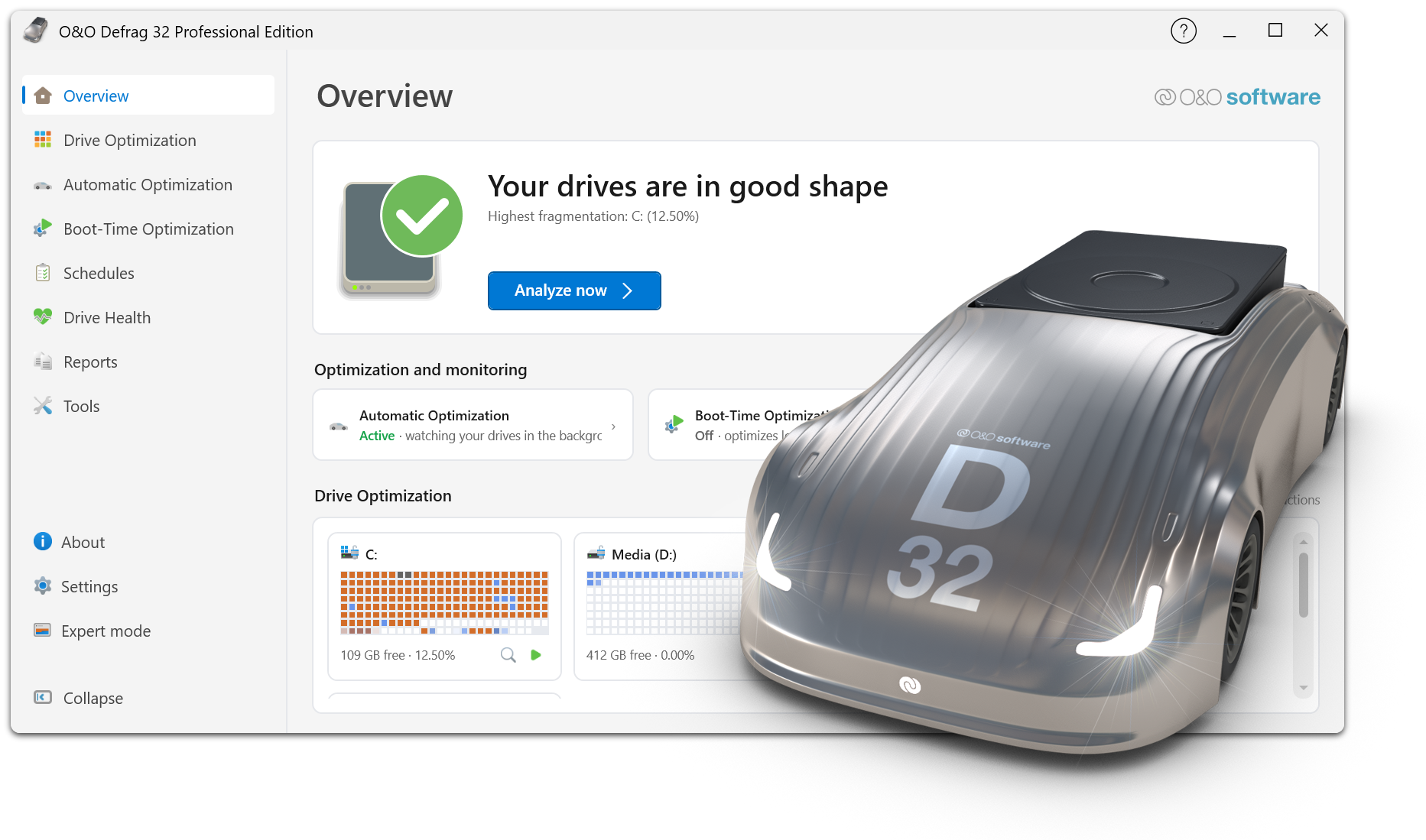
O&O Defrag ensures maximum drive performance at all times

Intelligent optimization technology adapts to the type of drive and keeps systems reliably fast, whether in daily office operations or under heavy load. With comprehensive automation functions, detailed analyses and proven optimization methods, O&O Defrag offers full control and measurable performance benefits – for individual workstations as well as for professional IT environments.

Automatic Drive Optimization

  • Fully automatic defragmentation of classic hard drives (HDD)
  • SSD-optimized procedures without unnecessary write access
  • Automatic detection of drive type (HDD / SSD)
  • Separate optimization of system and data drives
  • Long-term performance maintenance without manual intervention

Powerful defragmentation methods

  • Multiple optimization strategies for different requirements
  • Contiguous storage of fragmented files
  • Consolidation of free storage areas
  • Reducing future fragmentation
  • Optimization of folder and directory structures
  • Improved access times to frequently used files

Automation & Background Operation

  • Fully automatic background operation
  • Start of optimization when the system is idle
  • Time-controlled optimizations according to schedule
  • Event-based execution on inactivity
  • Automatically pause on user activity
  • Individual time windows per drive

Offline & Boot-Time Optimization

  • Optimization of locked system files before Windows starts
  • Processing files that are not accessible during operation
  • Scheduled offline optimization with automatic restart
  • Particularly effective in highly fragmented systems

Resource and system conservation

  • Low-priority defragmentation
  • Intelligent control of CPU and I/O load
  • No impact on running applications
  • Optimization only with sufficient system resources
  • Optional deactivation on battery power

Analysis & Transparency

  • Detailed analysis of the fragmentation state
  • Clear display of all drives
  • Display of last and next optimization operations
  • Logging of all optimization jobs
  • Traceable history of all measures

User-friendly operation

  • Single interface for all drives
  • One-click optimization with recommended settings
  • Automatic mode for maximum simplicity
  • Advanced Expert Options for Power Users
  • Clear status indicators and understandable feedback

Drive & File System Support

  • Optimizing NTFS Volumes
  • Internal and external drive support
  • Suitable for large disks and many files
  • Optimal management of large file structures
  • Security & Stability
  • Gentle optimisation processes
  • File System Integrity Protection
  • Clean cancel on restart or shutdown
  • Continuation of interrupted optimizations
  • Stable continuous operation on productive systems

Optimization for different application scenarios

  • Ideal for office and workstation computers
  • Optimizes workstations with large project files
  • Suitable for systems with SSD and HDD combinations
  • Long-term performance stability for archive and data drives
About us Newsletter For Partners Contact
Our Products Order Downloads Protecting Your Security - Securing Your Privacy
Support FAQ Platform Status News & Releases
Social Commitment Press Releases O&O Labs The O&O Group
© 1997-2026 O&O Software GmbH, Berlin
Privacy Policy Terms & Conditions EULA Cancel subscriptions Imprint