Features & Highlights of O&O ShutUp10 Free Edition and O&O ShutUp10 Premium
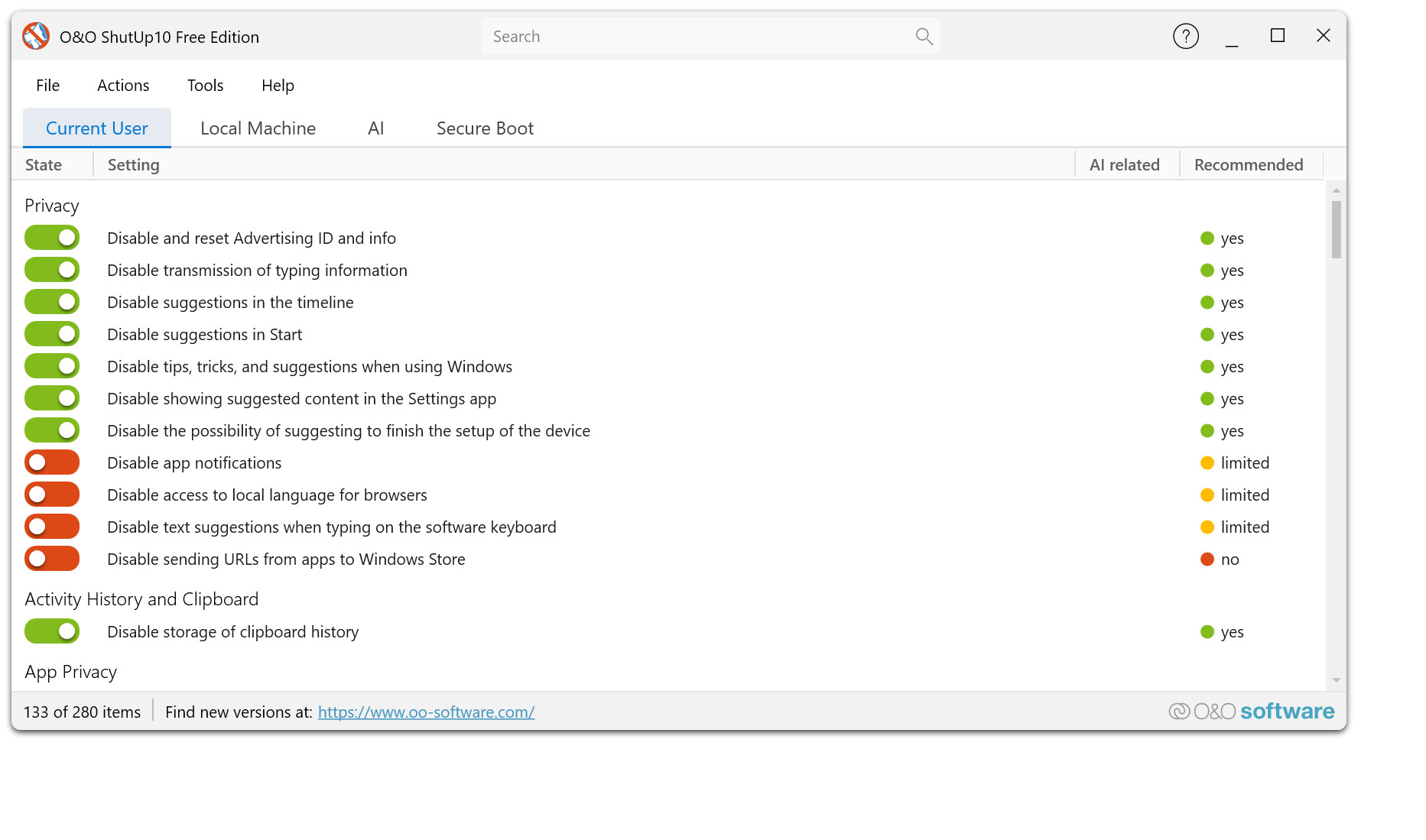
With O&O ShutUp10, you decide for yourself which Windows 10 and Windows 11 functions should be active – and which data Windows is allowed to transfer. All important privacy and system settings are clearly bundled in one place and can be adjusted with just a few clicks.
Clear recommendations help you make meaningful privacy decisions without deep expert knowledge or tedious searching in Windows system settings. This way you can improve your privacy quickly, transparently and free of charge.
For all those who don’t just want to set their settings once, but want to protect them permanently, O&O ShutUp10 Premium offers the next step: The premium version automatically monitors your selected settings and restores them when Windows changes them through updates or system changes.
This gives you the choice: free manual monitoring with O&O ShutUp10 or permanent automatic protection with O&O ShutUp10 Premium.
Privacy & Telemetry Control
- Centrally manage important privacy and system settings in Windows 11 and Windows 10
- Restriction of Windows Telemetry and Diagnostic Data Transfer
- Disabling Advertising ID and Personalized Advertising
- Customization of feedback and diagnostic reports
- Disabling online speech recognition and personalization features
- Reduce suggestions, tips, and ad-based content in Windows
Windows Apps & Background Activities
- Control which apps are allowed to be active in the background
- Restricting app access to contacts, calendars, email, and messages
- Control app access to microphone, camera, and location
- Regulation of access to file system, images, documents and libraries
- Limit access to motion data, Bluetooth, Wi-Fi, and device information
Location, Sensors & Device Access
- Disabling or restricting Windows Location Services
- Control over location history and location-based features
- Limitation of sensor access, for example to motion data
- Reduce the transmission of device and usage information
- More control over which Windows features are allowed to access personal device data
Windows Search, Cloud & Personalization
- Disabling Bing and Web Search in Windows Search
- Reduction of search and input personalization
- Restriction of cloud-based content in Start menu, search, and widgets
- Reduce Microsoft suggestions, recommendations, and personalized content
- More privacy-friendly configuration of Windows functions with cloud connection
Cortana, Voice Assistants & Online Services
- Disabling Cortana features, if available on the system
- Restriction of online services for voice input and text input
- Reducing personalized experiences through Microsoft services
- More control over voice-based and cloud-based Windows features
- Protection against unnecessary transmission of personal input and usage data
Updates, Reboots & Windows Recommendations
- Adaptation of update-related comfort functions
- Reduce automatic app recommendations and suggested installs
- Restrict distracting notices, tips, and suggestions in Windows
- More control over features that Microsoft can re-enable after updates
- Especially important after major Windows updates and feature updates
Security & Network
- Restrict automatic connections to open or public hotspots, if available
- Reduce network-related telemetry and sharing
- Restricting the transfer of certain usage data to Microsoft services
- More privacy-friendly configuration of network and connection functions
- Improve security for mobile devices, home networks, and public Wi-Fi networks
OneDrive & Microsoft account integration
- Reduce OneDrive alerts and auto-overlays
- More privacy-friendly configuration of Microsoft account and cloud features
- Restriction of cloud-related synchronization, depending on the specific Windows system
- More control over the connection between the local Windows system and Microsoft services
- Ideal for users who want to use Windows more locally and less cloud-based
Recommendations & safe presets
- Understandable recommendations on many data protection options
- Labeling of settings according to recommendation levels
- Quickly apply recommended data protection configurations
- Transparent information on the effect of individual options
- Ideal for beginners who want to improve privacy without having to research every Windows option themselves
Backup, Restore & Undo
- Export and import your own data protection configurations
- Backup of proven settings for later use
- Undo individual changes at any time
- Targeted reset of individual options
- Recommended in conjunction with system restore points before major changes
O&O ShutUp10 Free Edition
- Free management of the most important Windows privacy settings
- Portable use without installation
- No additional, unwanted software and no unnecessary reloading of components
- Ideal for users who want to manually control their settings
- Proven solution for anyone who wants to improve Windows data protection easily, transparently and free of charge
O&O ShutUp10 Premium
- Permanent monitoring of your chosen privacy settings
- Automatic recovery after Windows updates and system changes
- Protection against unintentional reset of settings already set
- More convenience because manual follow-up checks after updates are no longer necessary
- Ideal for users who don't just want to set their privacy once, but want to protect it permanently
Automatic enforcement in the premium version
- Set the desired settings once and keep them permanently
- Automatic reapplication when Windows changes settings
- Protection against newly enabled or reset privacy options
- Continuous background protection for greater reliability
- Especially helpful for frequent Windows updates and new system features
Freeware or Premium – You Decide
- O&O ShutUp10 is ideal for free, manual control of your data protection settings
- O&O ShutUp10 Premium complements this control with automatic monitoring and recovery
- Both versions offer transparent recommendations and ease of use
- Premium is the right choice if data protection is to be maintained permanently
- This allows you to choose exactly the protection that suits your everyday life
Set once. Permanently protected.
- With O&O ShutUp10 you can improve your Windows privacy for free and directly
- With O&O ShutUp10 Premium, your selected settings are retained even after updates
- You retain control over what Windows can reveal about you
- More transparency, less effort and permanently better data protection control
- Your privacy remains protected – even as Windows changes