Documents on O&O ShutUp10
Here you can find the manual for O&O ShutUp10. The documentation will help you to better understand the functions and settings of O&O ShutUp10 and to make targeted adjustments to your privacy and system settings under Windows.
Here you can find the manual for O&O ShutUp10.
O&O ShutUp10 Manual [online] [PDF Download]
O&O ShutUp10 and O&O ShutUp10 Premium FAQ
1. What is O&O ShutUp10?
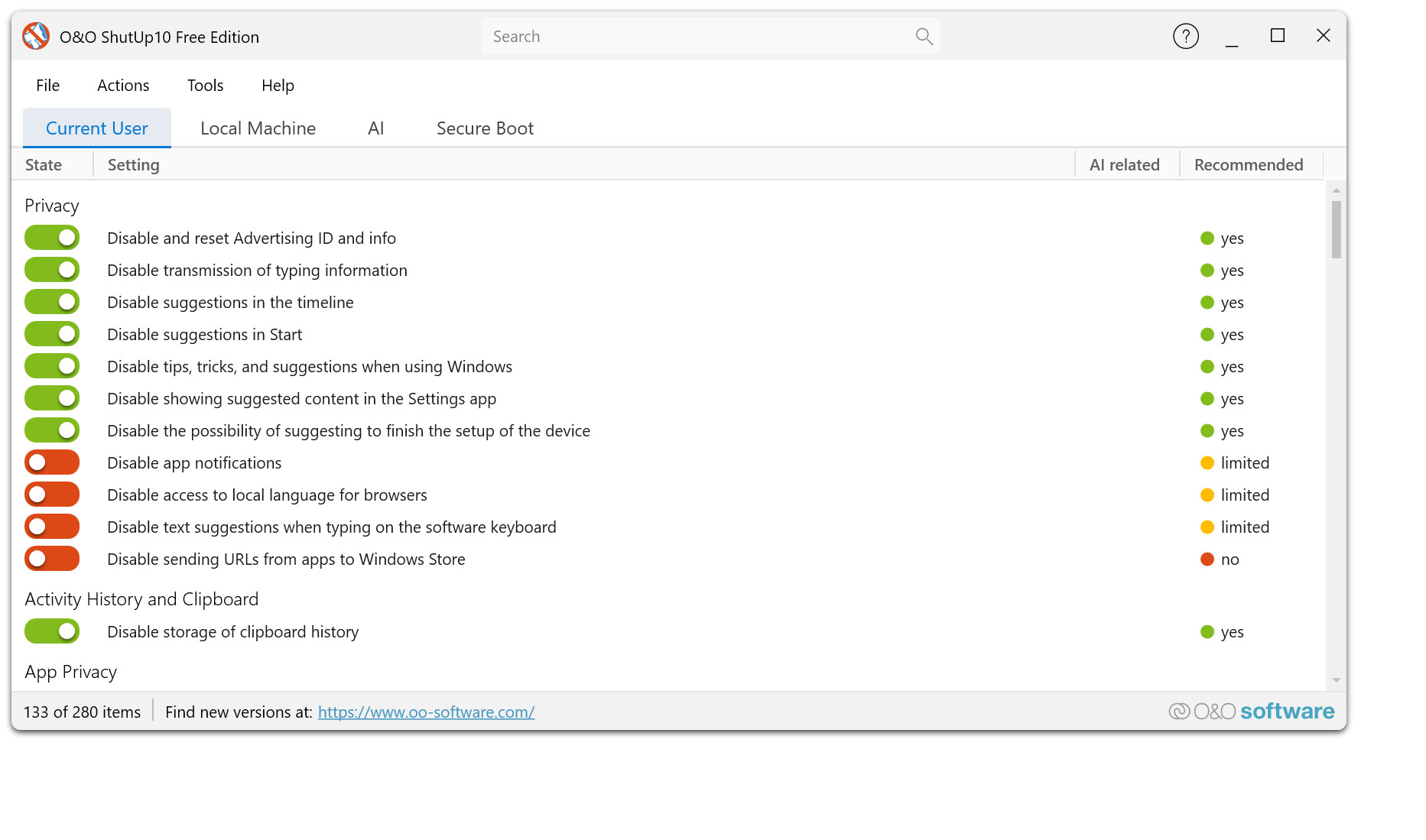
O&O ShutUp10 is the free data protection tool for Windows 11 and Windows 10. It bundles numerous privacy and system settings in one place and allows you to decide for yourself which functions Windows can use and which not.
Instead of clicking through many different Windows menus, you can adjust your privacy settings centrally, understandably and with just a few clicks.
2. What is O&O ShutUp10 Premium?
O&O ShutUp10 Premium is the extended version for all those who want to protect their data protection settings not only once, but permanently. The premium version monitors your chosen settings in the background and automatically restores them when Windows changes them through updates or system changes.
You define your desired settings once – O&O ShutUp10 Premium then ensures that they remain in place permanently.
3. For which Windows versions are O&O ShutUp10 and O&O ShutUp10 Premium suitable?
Both versions have been developed for Windows 10 and Windows 11. They help you manage privacy, security, and system settings comfortably without having to work your way through the Windows system menus.
4. Is O&O ShutUp10 still free of charge?
Yes. O&O ShutUp10 remains available as freeware and can be used free of charge. The freeware version offers the proven features to manually manage your privacy settings.
O&O ShutUp10 Premium is also available and is aimed at users who want more convenience, automation and long-lasting protection.
5. What is the most important difference between freeware and premium?
With O&O ShutUp10, you can manage your data protection settings manually. You can set the desired options, export and import profiles and undo changes if necessary.
O&O ShutUp10 Premium continues: The premium version permanently monitors your selected settings and automatically restores them when Windows changes them. This is a great advantage, especially after Windows updates, because you don’t have to manually check your settings again and again.
6. Does O&O ShutUp10 have to be installed?
No. O&O ShutUp10 is portable and does not need to be installed. You can start the program directly. No additional, unwanted or unnecessary software is downloaded or installed.
7. Does O&O ShutUp10 Premium have to be installed?
Yes. O&O ShutUp10 Premium uses a client/service architecture so that your selected data protection settings can be permanently monitored and automatically restored. This allows the premium version to work in the background and reliably protect your settings even after Windows updates.
8. Why is O&O ShutUp10 Premium worthwhile for private users?
Windows changes regularly. After updates, settings can be reset, new functions can be activated or existing data protection options can be changed. With O&O ShutUp10 Premium, you don’t have to constantly check manually whether everything is still set up the way you want it to.
The premium version takes over this control automatically. It is ideal for users who want to protect their privacy permanently without having to worry about it again after every Windows update.
9. What types of settings can I manage?
You can centrally manage a wide range of Windows settings around privacy, telemetry, diagnostics, app permissions, camera, microphone, location, Windows search, online features, advertising, personalization, and various convenience and security features.
10. What do the recommendations mean in the settings?
O&O ShutUp10 and O&O ShutUp10 Premium display recommendations for many settings. These help you assess which options are usually safe to customize, and which changes may have an impact on comfort or Windows features.
If you are unsure, you can start by using the recommended settings.
11. Can I apply recommended settings in one click?
Yes. You can apply recommended settings in one step and undo them if necessary. This makes both versions particularly easy to use – even for users without prior technical knowledge.
12. What happens after a Windows update?
With the freeware version O&O ShutUp10, you should check whether your desired settings are still active after major Windows updates. You can reapply your saved configuration if necessary.
O&O ShutUp10 Premium takes care of this step automatically. The premium version monitors your settings and restores them when Windows changes them through updates or system changes.
13. Can I back up my settings and use them on other PCs?
Yes. You can export configurations and import them again later. This is especially handy if you want to configure multiple PCs similarly or back up your proven privacy settings.
14. Can I undo changes?
Yes. Individual settings can be reset at any time. In addition, saved configurations can be restored. Before making any major changes, we also recommend creating a system restore point.
15. Does O&O ShutUp10 create system restore points?
Both versions support working with system restore points. This is useful before making extensive changes to Windows settings. This allows you to revert to a previous system state if necessary.
16. Can O&O ShutUp10 limit Windows functions?
Yes, individual privacy settings can affect certain Windows features, such as online search, personalization, voice-based services, or app access. That’s why O&O ShutUp10 displays recommendations and hints about the settings.
If you are unsure, first use the recommended settings and then check if you are missing certain features.
17. Does O&O ShutUp10 also support new Windows functions such as Copilot or Recall?
O&O ShutUp10 is continuously being developed and adapted to new Windows versions and new data protection options. This also includes settings around new Windows functions such as Copilot or Recall, as long as they are available and relevant on the respective system.
18. Which version is right for me?
O&O ShutUp10 is the right choice if you want to manage your privacy settings manually and for free. It is ideal for users who want to decide for themselves and manually reapply their settings if necessary.
O&O ShutUp10 Premium is the right choice if you want to protect your privacy permanently. The premium version is ideal if you don’t want to worry about your privacy settings again after every Windows update.
19. Can I use the free version first and switch to premium later?
Yes. You can start with O&O ShutUp10 and manage your privacy settings manually. If you want more comfort and long-lasting protection later, you can switch to O&O ShutUp10 Premium.
Your experience with the freeware version will help you choose exactly the settings that you want to be permanently protected by Premium.
20. Why should I buy O&O ShutUp10 Premium when the freeware is available?
The freeware version gives you the proven manual control over your Windows privacy settings. O&O ShutUp10 Premium complements this control with permanent automation.
If Windows changes your settings, you have to take action with the freeware version itself. Premium does this automatically in the background. This saves you time, avoids forgotten follow-up checks and protects your privacy permanently.
21. Do I need permanent administrator rights for O&O ShutUp10 Premium?
O&O ShutUp10 Premium works with a background component so that your selected settings can be reliably monitored and restored. This means that the user does not have to constantly intervene with administrator rights when Windows changes settings.
22. Does O&O ShutUp10 Premium change anything without my decision?
No. You determine which settings should apply. O&O ShutUp10 Premium then ensures that this selected configuration remains in place permanently. Control remains with you.
23. What is the most important advantage of O&O ShutUp10 Premium?
The most important advantage is the permanent protection of your privacy settings. You configure Windows once according to your ideas – O&O ShutUp10 Premium monitors these settings and automatically restores them when Windows changes them.
Set once. Permanently protected.
24. How can I contact O&O Support?
Software License Agreement (EULA) for O&O ShutUp10
IMPORTANT – PLEASE READ CAREFULLY: This License Agreement is a legally binding agreement between you (either as an individual or as an entity) and O&O Software GmbH for the software referred to above, which may include related software components, data carriers, printed materials, and online or electronic documentation. By installing, copying, or otherwise using the Software, you agree to be bound by the terms of this License Agreement. If you do not agree to the terms of this Agreement, you may not install or use the Software. The Software is protected by copyright laws and international copyright treaties, as well as other intellectual property laws and treaties. The software is licensed, not sold.
1. Grant of License
The Software Product is licensed as follows:
1.1 Installation and Use. O&O grants you the right to install and use copies of the Software on your computers. The software is considered used when it is loaded into the temporary memory (e.g. RAM) or installed in the permanent memory (e.g. hard drive, CD-ROM, etc.) of a computer in order to be accessible to end users.
1.2 Backups. You may also make copies of the Software Product as necessary for backup and archival purposes.
2. Description of Other Rights and Restrictions
2.1 Preservation of Copyright Notices. You may not remove or alter any copyright notices on any copy of the Software Product.
2.2 Disclosure. You may make exact, unaltered copies of this Software Product and distribute it only electronically (e.g., by making them available on downloadable websites) provided that: (a) the Software is distributed unmodified and in its entirety (incorporating or packaging the Software with an installer, wrapper, or similar is considered an unauthorized modification for purposes of this Agreement) and together with the complete user documentation, readme files, copyright, trademark, and other intellectual property notices, including this License Agreement, and all other components; and (b) such distribution may take place worldwide, except to the extent prohibited (directly or indirectly) by the laws of the Federal Republic of Germany.
2.3 Prohibition of reverse engineering, decompilation and disassembly. You may not reverse engineer, decompile, or disassemble the Software, except and only to the extent expressly permitted by applicable law, notwithstanding this limitation.
2.4 Rental. You may not rent, lease or lend the Software.
2.5 Transfer. You may permanently transfer all of your rights under this License Agreement, provided that the recipient agrees to the terms of this Agreement.
2.6 Compliance with Applicable Laws. You must comply with all applicable laws related to the use of Software.
3. Termination
Without prejudice to any other rights, O&O may terminate this License Agreement if you violate the terms of this Agreement. In this case, you must destroy all copies of the software.
4. Copyright
All rights to this software and all copies thereof, including but not limited to copyrights, belong to O&O or its suppliers. All rights to existing intellectual property used in this software belong to the respective rights holder and may be protected by applicable copyright or other intellectual property laws and treaties. This license agreement does not grant you any rights to use such content. All rights not expressly granted are reserved by O&O.
5. No Warranty
O&O expressly excludes any warranty for the software. The Software and related documentation are provided “as is” without warranty of any kind, either express or implied, including, without limitation, implied warranties of merchantability, fitness for a particular purpose, or non-infringement. The entire risk arising from the use or performance of the Software Product remains with you.
6. Limitation of Liability
To the maximum extent permitted by applicable law, in no event shall O&O or its suppliers be liable for any special, incidental, indirect, or consequential damages (including lost profits, business interruption, loss of business information, or other pecuniary damages) arising out of the use of or inability to use the Software or the provision or failure to provide support services, even if O&O has been advised of the possibility of such damages. . O&O’s total liability under any provision of this License Agreement shall be limited to the greater of the amount actually paid by you for the Software or EUR 0.01; if you have concluded an O&O Support Services contract, the entire liability is based on the terms of this contract. Because some states and jurisdictions do not allow the exclusion or limitation of liability, the foregoing limitation may not apply to you.
7. Final Provisions
This license agreement is governed by the laws of the Federal Republic of Germany. The United Nations Convention on Contracts for the International Sale of Goods (CISG) and the UNIDROIT Factoring Agreement of Ottawa do not apply. Any general terms and conditions on your part do not apply. If you are neither a private individual nor a resident of the Federal Republic of Germany, we agree that the Berlin Regional Court shall have jurisdiction over disputes arising from this contract.
8. Contact
If you have any questions about the O&O Software License Agreement or would like to talk to O&O, please contact us.
O&O Software
Bülowstraße 66
10783 Berlin
Germany
Tel. +49 (0)30 991 91 62 00
Fax +49 (0)30 991 91 62 99
E-mail: info@oo-software.com
Web: https://www.oo-software.com
Updated: 2016/03/09