Want to do more than just back up your data and securely erase it when needed? Learn more here.

Automatically backup, synchronize and protect – with O&O AutoBackup

O&O AutoBackup offers a particularly simple and flexible solution for the automatic backup and synchronization of important files, folders and databases. Once set up, the software takes over recurring backup tasks independently and ensures that personal documents, photos, videos, project files and other important data are regularly stored on an additional storage destination. Whether on external drives, USB media, OneDrive or S3-compatible storage destinations – O&O AutoBackup combines simple operation with modern data backup.

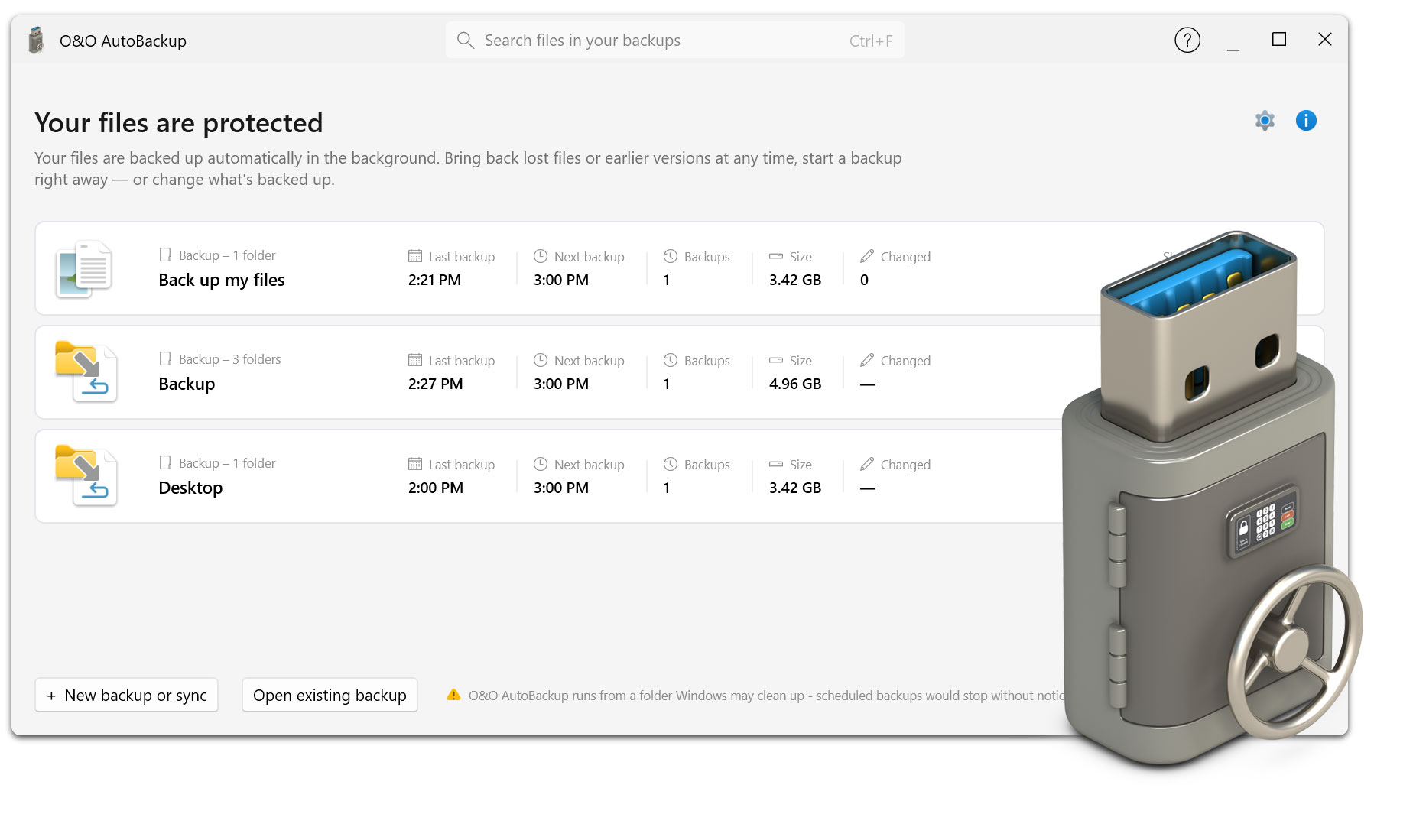
MO&O AutoBackup has been extensively developed. The completely new user interface clearly guides you through the setup of backup and synchronization tasks. In addition, OneDrive data can now be included, S3-compatible storage targets can be used, and secured data can be further protected by encryption and obfuscation. The tried-and-tested principle of O&O AutoBackup remains particularly convenient: If an assigned backup medium is connected, the appropriate task can be started automatically. This makes regular data backups an uncomplicated part of everyday life.

Backup and backup features

  • Automatic backup of selected files
  • Backup of complete folders and folder structures
  • Selecting partitions as backup sources
  • Targeted backup of personal and business data
  • Backup of documents, photos, videos and project files
  • Individually definable backup tasks
  • Multiple different backup tasks for different data sets
  • Flexible combination of backup sources and backup destinations
  • Automatic execution of recurring backup operations
  • Additional copies of important data on separate storage destinations

Synchronization functions

  • Synchronization of selected files and folders
  • Matching data between source and destination
  • Synchronization of local data sets
  • Synchronization with external storage media
  • Synchronization of OneDrive data
  • Flexible choice between copying and syncing
  • Individual synchronization tasks for different data sets
  • Regular synchronization of frequently changed files
  • Synchronization of personal work and document folders
  • Easily update existing backup stocks

Automation

  • Automatic execution of setup backup tasks
  • Automatic start when connecting a mapped storage device
  • Detection of intended USB hard drives
  • Detection of intended USB sticks
  • No need to manually start the backup
  • No manual selection and transfer of individual files necessary
  • Recurring data backup with minimal operator effort
  • Automated workflow for regularly connected backup media
  • One-time setup for recurring backup processes
  • Reduce the risk of forgotten manual backups

OneDrive support

  • OneDrive data backup
  • Synchronization of OneDrive data
  • Integrate OneDrive files into existing backup strategies
  • Back up on-premises and OneDrive data together
  • Flexibly combine OneDrive content with local backup destinations
  • Additional copy of important OneDrive data on your own storage media
  • Integration of cloud-based work folders into backup tasks
  • Centrally manage local and OneDrive data
  • Additional control over important files stored in OneDrive

S3-compatible save destinations

  • Support S3 compatible memory
  • Using Remote Storage Targets for Backup Tasks
  • Flexible choice between local and external storage destinations
  • Additional backup outside the local PC
  • Combining classic backup with S3-compatible storage
  • Suitable for individual external storage solutions
  • Extend local backup strategies to include remote storage targets
  • Flexible adaptation of the storage location to personal requirements

Local and external storage destinations

  • Backup to internal drives
  • Backup to external hard drives
  • Backup to SSDs
  • Backup to USB sticks
  • Removable Disk Support
  • Flexible selection of existing local drives
  • Use of separate backup media for different tasks
  • Automatic assignment of backup tasks to intended storage media
  • Easy integration of existing USB storage devices into the backup strategy

Encryption and privacy

  • Encryption of secured data
  • Additional protection of confidential files
  • Protection of personal documents and sensitive data assets
  • More secure storage of data on external storage destinations
  • Additional protection for outsourced backups
  • Protection against unauthorized access to secured content
  • Security features for personal and professional data
  • Combination of automatic backup and additional data protection

Obfuscation

  • Obfuscation of secured data
  • Additional obfuscation of stored content and structures
  • Difficult to draw direct conclusions about secured data sets
  • Additional layer of protection in addition to classic data backup
  • Suitable for backups to external or remote storage destinations
  • More control when dealing with confidential collateral assets

User interface and ease of use

  • Completely redesigned user interface
  • Modern and clear operating concept
  • Step-by-step setup of new backup tasks
  • Clear selection of source and destination
  • Clear selection of the desired backup method
  • Easy to set up even without any special technical knowledge
  • Quickly adapt existing backup tasks
  • Intuitive management of multiple backup jobs
  • Reduced manual effort in daily operations
  • Clear separation of data source, backup destination and backup method

Flexible backup strategies

  • Copying selected data to an additional storage destination
  • Synchronize data assets between source and destination
  • Individual strategy for each backup task
  • Separate tasks for different data types
  • Different storage destinations for different data sets
  • Combination of local, external and S3-compatible targets
  • Integration of OneDrive into personal backup concepts
  • Flexible adaptation to private and professional deployment scenarios
  • Suitable for simple backup copies as well as for regular synchronization

USB and removable storage device automatic

  • Automatic detection of connected backup media
  • Automatic start when connecting a designated USB drive
  • Assigning specific media to backup tasks
  • Data backup without additional opening of the application
  • Ideal for regularly connected external hard drives
  • Ideal for USB sticks as a mobile backup medium
  • Simple principle: connect, secure, done
  • Particularly low effort for regular backups

Protection of important personal data

  • Securing personal documents
  • Backing up photo collections
  • Backup of videos
  • Backup of important work files
  • Backing up project folders
  • Additional copy of regularly modified files
  • Protect important data from loss due to accidental deletion or defects in the primary storage location
  • Easily build a personal backup routine
  • Suitable for everyday data protection without complex backup infrastructure

Areas of application

  • Automatic backup to the private Windows PC
  • Backing up important data on work computers
  • Regular backup to external hard drives
  • Mobile backup to USB storage media
  • Synchronization of frequently used databases
  • Backup of important OneDrive files
  • Using S3-compatible storage destinations
  • Additional protection of sensitive data through encryption
  • Building a simple multi-layered backup strategy
  • Automate recurring backup tasks

Advantages in everyday life

  • Less manual work with regular backups
  • No repeated copying of individual files by hand
  • Less risk of forgetting important fuses
  • Up-to-date copies of important data on additional storage destinations
  • Simple backup without complex backup configuration
  • Flexible adaptation to existing storage media
  • Quickly set up new backup tasks
  • Automatic processes after one-time configuration
  • Clear management of personal backup strategies
  • Data backup that can be easily integrated into everyday life