

System requirements
Operating system: Windows 11, Windows 10
O&O AppBuster FAQ
1. What is O&O AppBuster?
O&O AppBuster is a free program from O&O Software GmbH in Berlin that removes bloatware on Windows 10 and 11: pre-installed Microsoft apps, third-party apps, desktop programs and extras from PC manufacturers. It runs without installation, is available in 17 languages, installs updates via winget and blocks Start menu ads.
2. What is bloatware?
Bloatware means pre-installed apps and programs you don’t need: apps that Microsoft ships with Windows 10 and 11 as well as extras and telemetry from PC manufacturers. They take up disk space, sometimes run in the background and can collect data. O&O AppBuster shows these apps and removes them on request.
3. How do I remove bloatware on Windows 11?
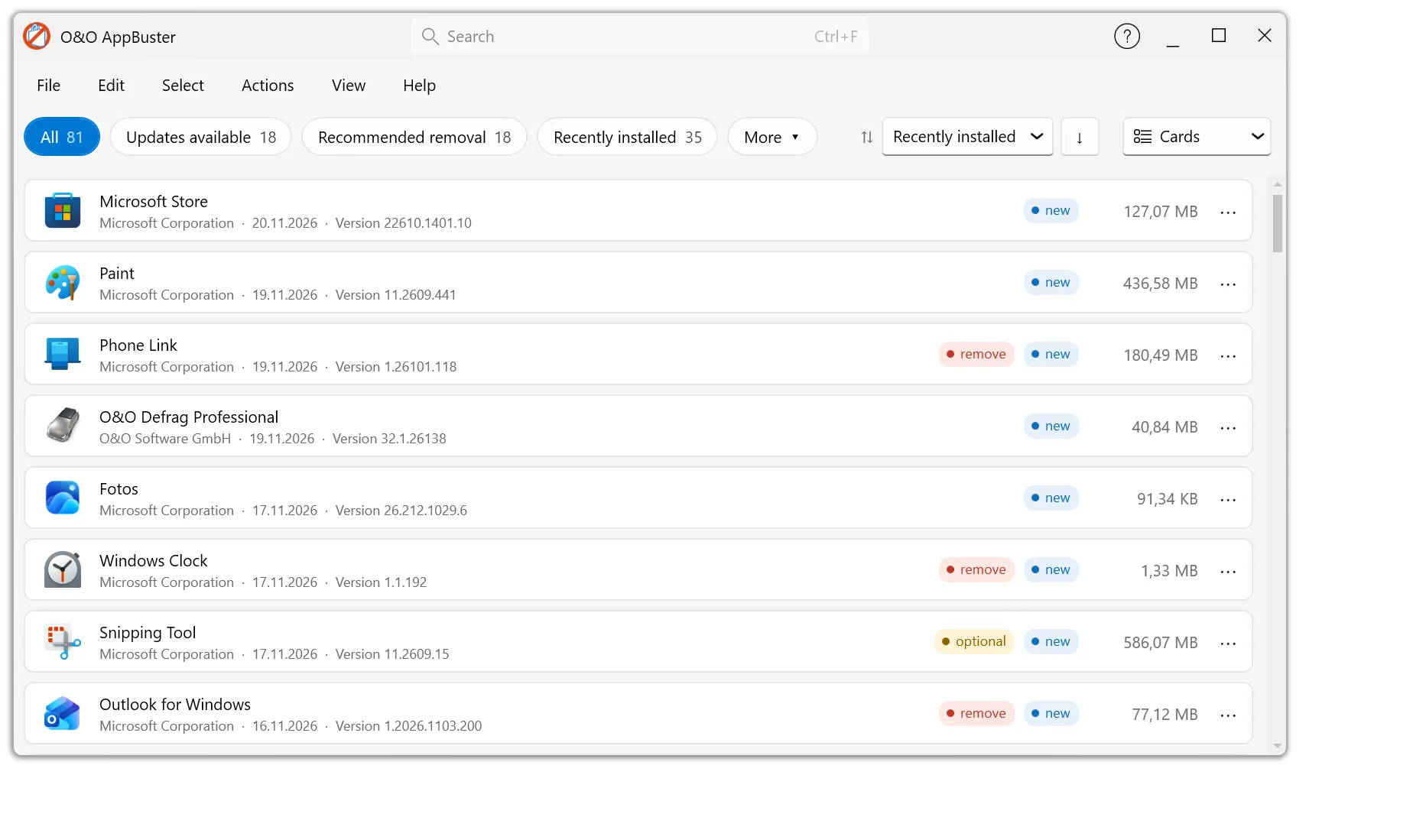
Download O&O AppBuster for free and start it – no installation required. The “Recommended removal” filter shows the apps that O&O AppBuster recommends removing, each with a reason. Select them, for example via “Select” › “Select all apps recommended for removal”, click “Remove”, choose whether to remove them for the current user, for all users or for the entire PC, and confirm. A restore point can be created beforehand.
4. For which Windows versions is O&O AppBuster suitable?
O&O AppBuster has been developed for Windows 10 and Windows 11 and runs on PCs with x64 and ARM64 processors. It supports all editions of these operating systems.
5. Is O&O AppBuster free?
Yes. O&O AppBuster is free of charge and can be used free of charge by private users as well as by companies and educational institutions.
6. Does O&O AppBuster have to be installed?
No. O&O AppBuster is a portable application and does not need to be installed. The program runs immediately and does not install any additional or unwanted software.
7. Which apps can I remove with O&O AppBuster?
With O&O AppBuster, you remove pre-installed Microsoft apps, third-party apps, desktop programs and extras from PC manufacturers such as HP, Dell, Lenovo, ASUS, Acer and MSI. Apps that Windows hides by default are also displayed and can be managed. You choose whether an app is removed for the current user, for all users or for the entire PC.
8. Can I restore removed apps?
Yes. O&O AppBuster allows you to reinstall previously removed apps with just one click, as long as they are supported by Windows.
9. What are orphaned and defective apps?
Orphaned apps are leftovers of apps and programs that are no longer installed; defective apps are missing their installation package. O&O AppBuster detects both, shows them marked in the “All” view and cleans them up on request. It also removes leftovers of Windows apps that are only staged.
10. Can O&O AppBuster update programs?
Yes. O&O AppBuster finds updates for installed desktop programs via winget and installs them on request. Apps with an available update are marked with a green dot, and the “Updates available” filter shows them all together. The program detects new versions of O&O AppBuster itself at startup and installs them from the status bar.
11. Can O&O AppBuster turn off the ads in Windows?
O&O AppBuster blocks Start menu ads and the Windows welcome screen.
12. Is O&O AppBuster safe to use?
Yes. O&O AppBuster uses official Windows interfaces for app management. A system restore point can be created automatically before changes, so that adjustments can be undone at any time. Before removing from the entire PC, O&O AppBuster warns you and asks for confirmation, and running programs are asked to close before they are uninstalled.
13. Can O&O AppBuster affect Windows functions?
Removing certain apps can affect individual Windows features. O&O AppBuster therefore flags system-relevant applications and gives for each app the reason why it should be removed, kept or cannot be removed.
14. Are hidden or protected apps shown as well?
Yes. O&O AppBuster also displays apps that are not visible in Windows by default and allows them to be managed, if Windows allows it.
15. Does O&O AppBuster require an internet connection?
Removing apps usually doesn’t require an internet connection. An internet connection is required to reinstall certain apps, for updates of desktop programs via winget and for new versions of O&O AppBuster.
16. In which languages is O&O AppBuster available?
O&O AppBuster is available in 17 languages, including English, German, French, Spanish, Italian, Dutch, Polish, Czech, Turkish and Korean.
17. Is O&O AppBuster also suitable for companies?
Yes. O&O AppBuster is suitable for private users as well as for companies and educational institutions, for example for cleaning up new Windows installations or standardizing systems. Apps of users with Microsoft Entra ID are found as well.
18. Does O&O AppBuster delete personal data?
O&O AppBuster only removes apps and programs. Personal files or user data are not deleted.
19. What should I consider before use?
We recommend creating a system restore point before making major changes and following the instructions in O&O AppBuster, especially for system-related apps.
20. Can I use O&O AppBuster on multiple PCs?
Yes. Since O&O AppBuster is portable, it can easily be used on several PCs without having to be installed.
21. How can I contact O&O Support?
If you have any questions about O&O AppBuster, you can contact O&O Support via the following pages:
Support for registered users (customer support):
https://www.oo-software.com/en/support/csupport
Support for trial and freeware versions:
https://www.oo-software.com/en/support/tsupport
End User License Agreement (EULA) for O&O AppBuster
IMPORTANT – PLEASE READ CAREFULLY: This license agreement is a contractual agreement between you (a private or legal entity) and O&O Software GmbH regarding the aforementioned software, which may include program components, media, printed materials, and online or electronic documentation. By installing, copying, or otherwise using the Software, you agree to be bound by the terms of this License Agreement. If you do not agree to the terms of this License Agreement, you may not install or use the Software.
The Software is protected by copyright laws and international copyright treaties, as well as other intellectual property laws and conventions. The software is licensed, not sold.
1. Grant of License
The Software is licensed as follows:
1.1 Installation and Use. O&O grants you the right to install and use the Software and its copies on your computers. The software is in use when it is loaded into volatile memory (e.g. RAM) or installed in permanent memory (e.g. hard drive, CD-ROM, floppy disk) in order to be accessible to end users.
1.2 Backups. You may also make backup copies of the Software if necessary for backup and archival purposes.
2. Description of Other Rights and Restrictions
2.1 Copyright Notices. You may not alter or remove the copyright notices on any copies of the Software.
2.2 Sales. You may make exact and unmodified copies of this software and distribute these copies free of charge only by electronic means (e.g. via Internet sites), provided that: (a) that the Software will be distributed unmodified (enclosing the Software with an installer, wrapper, or similar is an unauthorized modification within the meaning of this Agreement) and in its entirety, including complete user documentation, readme files, copyright and trademark notices, and other intellectual property notices, including this License Agreement, and (b) that such distribution may take place anywhere in the world, except for countries to which the export of software is prohibited (directly or indirectly) by the regulations of the Federal Republic of Germany.
2.3 Prohibition of reverse engineering, decompilation and disassembly. You may not reverse engineer, decompile, or disassemble this Software, except and only to the extent that such activities are expressly permitted by applicable law notwithstanding this limitation.
2.4 Rental. You may not rent, lease or lend the Software.
2.5 Transfer. You may assign all of your rights permanently, provided that the recipient agrees to the terms of this License Agreement.
2.6 Compliance with Applicable Laws. You must comply with all applicable laws regarding the use of software.
3. Termination of the contract
Without affecting all other possible rights, O&O may terminate this License Agreement if you violate the terms of this Agreement. In this case, you need to destroy all copies of the software.
4. Copyrights
All rights to this software and its copies, including but not limited to copyrights, are owned by O&O and its suppliers. All intellectual property rights relating to this Software that may be accessed through the use of the Software are the property of their respective owners and may be protected by applicable law or other conventions and intellectual property rights. This License Agreement does not grant you any rights to use this property. All rights not expressly granted are reserved by O&O.
5. No Warranty
O&O expressly disclaims all warranties for the software. The Software and any related documentation are provided “as is” without warranties of any kind, either express or implied, including, without limitation, implied warranties or merchantability, fitness for a particular purpose, or non-infringement. The entire risk arising from the use or performance of the Software is borne by you.
6. Limitation of Liability
To the maximum extent permitted by applicable law, O&O or its suppliers shall not be liable for any intentional, incidental, indirect, or consequential damages of any kind (including, without limitation, loss of profits, business interruption, loss of business information, or any other pecuniary loss) arising out of the use of the Software, the inability to use the Software, or the support services warranted or not, even if O&O has been informed of the possibility of such damages. O&O’s total liability under this License Agreement shall be limited to the greater of the amount you paid for the Software or to 0.01 Euros; unless you have entered into a maintenance contract with O&O, in which case O&O’s entire liability will be governed by the terms of that contract. Because some states and jurisdictions do not allow the exclusion or limitation of liability, the above limitation may not apply to you.
7. Final Provisions
The contract is governed by German law. The Unified UN Convention on Contracts for the International Sale of Goods (CISG) and the UNIDROIT Factoring Convention of Ottawa are not applicable. Any terms and conditions of yours do not apply. In the event that you are a merchant or do not have a registered office in the Federal Republic of Germany, we agree on the Berlin Regional Court as the competent court for disputes arising from this contract.
8. Contact
If you have any questions about the EULA or would like to contact O&O, please contact us.
O&O Software GmbH,
Bülowstraße 66
10783 Berlin
Germany
Tel. +49 (0)30 991 91 62 00
Fax +49 (0)30 991 91 62 99
E-mail: info@oo-software.com
Web: https://www.oo-software.com
Last update: 2016-03-09